
Quick Answer: AI document processing uses OCR, computer vision, NLP, and workflow automation to classify documents, extract structured fields, validate business rules, and push approved data into ERP, CRM, claims, HR, or compliance systems. Mature IDP pipelines combine tools such as Amazon Textract, Google Document AI, Python services, RAG, human review queues, audit logs, and data security controls.
AI document processing matters when manual document handling becomes a bottleneck for finance, legal, insurance, HR, customer support, or compliance teams. The practical question for a CTO, Founder, or COO is not whether OCR can read a PDF. The real question is whether the business can connect extraction accuracy, exception handling, security, and integration cost to measurable ROI.
- Google Document AI, Azure AI Document Intelligence, and Amazon Textract show how major cloud providers have invested in OCR, machine learning models, business software, and developer tooling for IDP workflows.
- Modern multimodal LLMs and vision-capable AI models can analyze document images, scanned pages, screenshots, and mixed-layout content. In production IDP, they should still be paired with structured extraction, validation rules, confidence thresholds, evaluation datasets, and human review for high-risk outputs.
- New lightweight document-specific LLMs like DocLLM have emerged, demonstrating a 15%+ improvement in understanding form-based documents compared to leading models.
This guide explains the core AI document processing workflow and shows eight implementation examples: invoices, email attachments, contracts, support tickets, onboarding documents, insurance claims, data migration, and compliance reporting. For each use case, the business value depends on the same architecture pattern: document intake, classification, extraction, validation, human-in-the-loop review, system integration, and monitoring.
What is AI document processing?
AI document processing is the use of machine learning, natural language processing, OCR, and computer vision to turn unstructured or semi-structured documents into validated business data. A production-grade intelligent document processing (IDP) system can handle PDFs, scans, images, emails, forms, tables, handwritten fields, and mixed-layout documents.
The core advantages of AI intelligent document solutions include:
- Streamlined data entry: Intelligent document processing significantly reduces the need for manual data entry and frees up time for workers to focus on more strategic work.
- Rapid document processing: Intelligent document processing software accelerates document turnaround times, swiftly handling large batches of documents.
- Enhanced accuracy: By minimizing human intervention, AI document processing reduces the likelihood of errors, ensuring high accuracy in data extraction and interpretation.
- Consistent data handling: AI document and data processing systems apply the same extraction rules, confidence thresholds, validation logic, and audit trail requirements across large document batches.
For B2B teams, the value of AI document processing comes from operational throughput and data reliability. A well-designed IDP pipeline reduces manual re-keying, shortens cycle time, improves compliance evidence, and gives downstream systems cleaner data for reporting, analytics, and AI workflows.
What are the 3 steps in an AI document processing workflow?
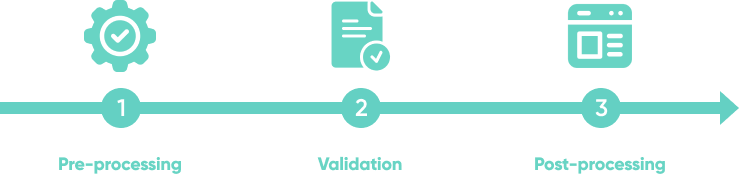
Most AI intelligent document processing work is organized into three phases. In a production system, each phase should expose metrics such as document volume, extraction confidence, exception rate, straight-through processing rate, and average handling time:
- Pre-processing: Prepares raw unstructured or structured data for analysis through OCR, image cleanup, page splitting, table detection, layout parsing, language detection, and metadata normalization.
- Validation: Checks extracted values against business rules, ERP or CRM records, purchase orders, KYC databases, compliance requirements, and human review thresholds.
- Post-processing: Sends approved data to the right destination, such as an ERP, accounting platform, claims system, CRM, document repository, data warehouse, or RAG knowledge base.
RAG and extraction should not be treated as the same thing. RAG is useful when users need to search, summarize, and ask questions over processed documents. ERP, CRM, claims, and finance automation usually require structured extraction, schema validation, deterministic business rules, and explicit approval controls.
What business challenges decide whether AI document processing will work?
AI-enabled intelligent document processing can reduce operational load, but the result depends on document variability, integration complexity, compliance scope, and review design. Before selecting a tool or building a custom pipeline, businesses should evaluate these challenges:
- Choosing the right business workflow: Prioritize workflows with high volume, repeatable document types, measurable cycle time, and a clear owner for exceptions.
- Data availability: Extraction accuracy depends on representative sample documents, labeled examples, edge cases, historical corrections, and clean reference data.
- AI tool selection: Compare managed services such as Amazon Textract, Google Document AI, Azure AI Document Intelligence, and Rossum against custom Python pipelines when layout variability, security, or integration depth is high.
- User support and training: Human review teams need clear confidence scores, exception categories, escalation paths, and feedback loops so model quality improves over time.
- Security and compliance: IDP systems often process contracts, invoices, IDs, medical records, or financial documents, so access control, encryption, retention policies, audit logs, GDPR, SOC 2, HIPAA, and vendor risk must be part of the architecture.
Is AI document processing worth it?
AI document processing is worth evaluating when a workflow has enough volume, cost, or risk to justify automation beyond basic OCR. A practical business case should compare the current manual process with a target IDP workflow across these decision factors:
- Monthly document volume: Higher volume makes automation easier to justify, especially when the same document types repeat across suppliers, customers, employees, or claims.
- Manual handling cost: Estimate the time spent on intake, data entry, validation, corrections, approvals, and rework, not only the first extraction step.
- Exception rate: If many documents require judgment, IDP can still help, but the goal should be better triage and review queues rather than full straight-through processing.
- Integration complexity: ERP, CRM, claims, HR, accounting, and data warehouse integrations often determine project cost more than OCR accuracy.
- Compliance and audit risk: Regulated workflows need stronger controls, retention rules, evidence trails, and human approval before automation should scale.
- Expected STP rate: A realistic straight-through processing target should be based on field-level accuracy, confidence thresholds, and representative test documents.
Should you buy an IDP tool or build a custom AI document processing pipeline?
Buy a pre-built IDP tool when the document type is standard, integrations are simple, compliance requirements are covered by the vendor, and speed matters more than workflow control. Invoice capture, basic OCR, and simple email triage often fit this pattern.
Build a custom AI document processing pipeline when the business has proprietary document formats, regulated data flows, complex approval logic, or a need to connect extraction with internal systems. A common custom architecture uses object storage for intake, a queue such as AWS SQS or Celery for async processing, Amazon Textract or Google Document AI for OCR, a model or rules layer for classification and extraction, Python services for validation, a human review UI for exceptions, integration workers for ERP or CRM updates, and observability for accuracy, latency, drift, and cost per document.
A production IDP workflow should be evaluated before it is automated end to end. Teams should define a representative test set, field-level and document-level accuracy targets, false positive and false negative thresholds, confidence thresholds, exception categories, reviewer SLAs, correction feedback loops, audit logging, retention rules, drift monitoring per vendor or document template, and cost per document. This evaluation layer is what separates a useful document automation system from a demo that only works on clean examples.
What are the best AI document processing examples for B2B workflows?
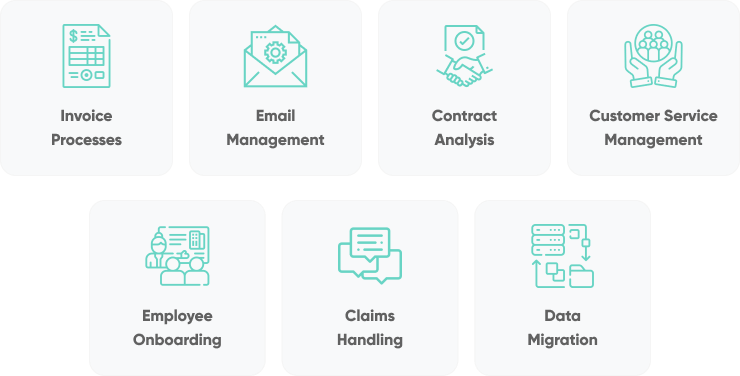
The best AI document processing examples are workflows where documents carry operational, financial, legal, or compliance value. These eight use cases show where IDP can reduce manual work, improve data quality, and create a better audit trail:
AI invoice processing automation
AI automates invoice processing by extracting supplier details, line items, PO numbers, VAT or tax fields, payment terms, and totals from invoices, then validating those fields against purchase orders and accounting rules. A mature invoice automation workflow connects OCR, approval routing, ERP integration, and payment controls.
- Efficient data handling: Automating invoice intake, extraction, validation, approval packet preparation, and payment scheduling significantly reduces manual workload and streamlines financial operations.
- Accuracy and compliance: The use of AI in invoice processing minimizes errors and supports compliance with financial policies, tax rules, segregation of duties, and audit requirements.
- Improved cash flow management: AI-driven invoice processing and payment scheduling contribute to better cash flow management, timely payments, and healthier vendor relationships.
Data extraction and management
The first step in automating invoicing processes is data extraction and management. AI tools can scan invoices and extract dates, line items, purchase order references, tax identifiers, currencies, and amounts using OCR and layout-aware models. The extracted data is normalized into a structured format suitable for ERP or accounting systems such as NetSuite, SAP, Microsoft Dynamics, QuickBooks, or Xero.
| Action | Impact |
|---|---|
| Invoice data extraction | Scans and extracts key invoice details using OCR, enhancing accuracy in data capture. |
| Structured data organization | Organizes extracted data into a structured format, facilitating easy integration with financial systems. |
Invoice validation and approval
Once data is extracted, AI systems can facilitate invoice validation. Using preset rules and learning from historical data, they can ensure invoices match purchase orders and flag discrepancies. For approval, AI-enabled workflow tools can automatically route invoices to the appropriate person, who can review and approve them with a single click. This accelerates the approval process and helps maintain consistent cash flow.
| Action | Impact |
|---|---|
| Invoice matching | Compares invoice data with purchase orders, ensuring accuracy and consistency in billing. |
| Discrepancy detection | Flags discrepancies between invoices and orders, aiding in quick identification and resolution of errors. |
| Automated approval routing | Directs invoices to the right approver based on rules, streamlining the approval process. |
Payment processing and record keeping
The final phase is payment preparation, reconciliation, and record keeping. AI systems can prepare payment suggestions, due-date schedules, reconciliation candidates, and approval packets based on invoice data and company payment policies. Actual payment execution should remain behind finance controls, segregation of duties, authorized approval workflows, fraud checks, and audit trails. This automation supports timely payments, maintains vendor relationships, and provides a transparent financial record without removing the controls that finance teams need.
| Action | Impact |
|---|---|
| Scheduled payments | AI prepares payment schedules based on due dates and policies, helping teams manage cash flow effectively. |
| Reconciliation | AI aligns transaction records with bank statements, maintaining accuracy in financial records. |
| Comprehensive logging | Maintains detailed logs of transactions, aiding in compliance and enhancing financial analysis. |
Recommended tools:
- If you want to integrate an invoice processing solution into Microsoft Power Apps or simply want to leverage a pre-built model to build a custom solution, consider Microsoft AI Builder Prebuilt Invoice Processing
- If you’re looking for an invoice processing tool that can handle complex invoices and integrate with other business systems such as ERP and accounting software, consider Rossum AI Invoice Automation.
Read More: 8 Intelligent Document Processing Tools With The Best Accuracy
AI email and attachment management
AI streamlines email management by classifying inbound messages, extracting structured fields from attachments, and routing the result to CRM, helpdesk, finance, or document repositories. The key architecture pattern is email intake, attachment parsing, entity extraction, deduplication, and workflow routing.
- Improved time management: AI-driven email categorization and tagging help in efficiently prioritizing and managing emails, saving significant time otherwise spent on manual sorting.
- Enhanced information accessibility: Through precise extraction of details from emails and attachments, AI ensures that crucial information is readily accessible, enhancing decision-making and responsiveness.
- Optimized file management: The ability of AI to convert and synchronize attachments with cloud storage simplifies file management, improving overall organizational efficiency.
Email categorization and tagging
AI algorithms can identify and sort emails into pertinent categories, which aids in prioritization and response efficiency.
| Action | Impact |
|---|---|
| Urgency identification | Filters and prioritizes emails based on importance and deadlines, aiding in quick response to critical communications. |
| Work-related tagging | Tags emails related to projects and tasks, facilitating better work management and focus. |
| Personal email separation | Separates personal messages to maintain professional focus and organize personal communications effectively. |
Attachment and content extraction
Intelligent document recognition technology can be used to automatically save email attachments to designated folders, convert them into searchable formats, and sync them with cloud storage solutions. Additionally, they can extract vital information such as dates, names, and invoice details from the content of emails, making this data easily accessible and ready for further processing.
| Action | Impact |
|---|---|
| Data extraction from emails | Extracts crucial information from email content, streamlining data entry and processing tasks. |
| File conversion | Converts attachments into searchable formats, facilitating easy retrieval and review of information. |
| Cloud synchronization | Syncs attachments with cloud storage, ensuring data backup and accessibility across devices. |
Recommended tools:
- If you’re looking for an AI-powered email assistant that can help you compose and respond to emails, consider Mailbutler Smart Assistant
- EmailTree AI is a good choice if you’d like an AI-powered email management solution that can be integrated with CRMs, and helpdesk software.
AI contract analysis
AI improves contract analysis by extracting clauses, obligations, renewal dates, liability limits, termination rights, governing law, and data protection language from legal documents. For legal, finance, and procurement teams, the strongest use case is searchable contract intelligence with risk flags and review workflows.
- Improved compliance management: AI can flag missing clauses, unusual wording, renewal risk, and potential gaps against policies or regulations such as GDPR, HIPAA, and employment laws. Final legal interpretation should remain with qualified reviewers.
- Efficient risk management: By identifying potential legal and regulatory risks and providing actionable review cues, AI-powered intelligent document processing solutions support proactive risk management and legal operational efficiency.
Key terms extraction
Intelligent document processing software can swiftly identify and extract structured data, key terms and clauses from contracts such as, obligations, rights, and deadlines.
| Action | Impact |
|---|---|
| Key terms extraction | Identifies and extracts each party's contractual duties, rights, and key dates, deadlines, and actions. |
| Automated summarization | Summarizes key contract elements, providing a quick and accessible overview for review and decision-making. |
Compliance monitoring
AI tools can assess contracts against defined standards, policies, and legal requirements. The technology can flag missing data processing agreements, non-standard liability clauses, unusual termination language, GDPR gaps, or sector-specific issues before contracts move to signature. It should be framed as review support, not a guarantee of legal compliance.
| Action | Impact |
|---|---|
| Regulatory compliance check | Flags potential gaps against specific regulations like GDPR and SEC rules, supporting legal review and risk mitigation. |
| Data protection assessment | Checks contract language against data protection standards such as HIPAA and CCPA, supporting privacy review. |
| Monitoring and alerts | Monitors contracts against defined policy rules and provides alerts on potential issues. |
Recommended tools:
- If you’re looking for a tool to help you extract and analyze data from contracts, consider Evisort Contract Intelligence.
- Legartis is an AI-powered contract management solution that helps businesses automate their contract workflows by extracting data from contracts, identifying risks, and providing insights into contract performance.
- Google Cloud Document AI is a solid choice for teams that are already committed to Google Cloud and want to explore a managed AI-powered document processing tool with contract analysis capabilities.
AI customer service document processing
AI document processing improves customer service by extracting intent, product names, order IDs, invoice references, screenshots, and attachments from customer inquiries. When combined with a searchable knowledge base or RAG pipeline, support teams can answer faster while preserving traceability to source documents.
- Rapid response capabilities: AI-enabled instant information retrieval facilitates quick and accurate responses to customer queries, significantly improving response times and accuracy.
- Customized customer interaction: By analyzing past customer interactions, AI provides personalized responses, greatly enhancing customer satisfaction and experience.
- Streamlined ticket handling: AI-driven service ticket categorization ensures efficient routing and prioritization of customer issues, leading to faster resolution times and improved allocation of support resources.
- Traceable answers: When support uses RAG, the answer should point back to source documents, policies, or tickets so agents can verify the response before sending it.
Instant information retrieval
With AI algorithms, customer service representatives can instantly access relevant information. Data from various documents, such as FAQs, manuals, and product guides, are indexed and made searchable, enabling representatives to provide fast and accurate answers to customer inquiries.
| Action | Impact |
|---|---|
| Instant data retrieval | AI quickly pulls data to respond to customer queries, improving response time and accuracy. |
| Personalized responses | Analyzes customer interaction history to provide tailored responses, enhancing customer satisfaction. |
Service ticket categorization
Service ticket categorization, facilitated by AI, greatly enhances customer support efficiency. Upon the arrival of a service ticket, AI systems automatically analyze its content and categorize it based on various criteria such as topic, urgency, and relevance. This categorization process ensures that each ticket is promptly routed to the appropriate department or specialist. The key benefits include prioritizing urgent issues and ensuring that specialists handle tickets that match their expertise.
| Action | Impact |
|---|---|
| Content analysis | Analyzes ticket content to determine the most relevant category and priority level. |
| Priority assignment | Assigns prioritization levels to tickets, ensuring urgent issues are addressed first. |
| Ticket routing | Directs tickets to the appropriate department or specialist, improving response times and service quality. |
Recommended tools:
- If you’re already using Zendesk or are looking for an all-in-one ticketing and customer support platform that can classify customer inquiries, extract data from them, and route them to the right team or individual, consider Zendesk AI.
- If you need a solution that can help support agents compose and respond to customer inquiries, summarize inquiries, and improve spelling and grammar, then HappyFox Assist AI’s AI-powered chatbot may be a good fit.
- Shelf Search Copilot is a good fit for teams that need to extract and analyze data from customer support inquiries and integrate the workflow with systems such as CRM and ERP.
AI employee onboarding document processing
AI makes employee onboarding more efficient by extracting and validating identity documents, tax forms, employment agreements, certificates, and HR forms. For regulated companies, the workflow must combine OCR, identity verification, access control, retention rules, and privacy compliance.
- Faster onboarding: AI systems rapidly validate essential documents like passports and driver's licenses using advanced techniques like OCR and facial recognition, significantly reducing the time needed for manual checks and enhancing verification accuracy.
- Compliance support: By enforcing access controls, retention rules, audit logs, and approved data handling patterns, AI-enabled workflows help HR teams maintain privacy compliance and reduce data handling risk.
Document verification
Document processing systems powered by AI are designed to instantly validate a range of documents, such as passports, driver's licenses, or social security cards, against a set of predefined criteria. AI can analyze and verify documents in seconds, significantly faster than manual checks. Additionally, accuracy is improved with reduced human error by consistently applying verification rules.
| Action | Impact |
|---|---|
| Optical character recognition (OCR) | Reads text from documents for verification purposes. |
| Facial recognition | Matches photos in documents with live images or other ID photos. |
| Data cross-checks | Compares and validates information against external databases. |
Personal information processing
AI tools capture and fill new hires’ personal information into company systems and ensure uniform data entry across various platforms and databases.
| Action | Impact |
|---|---|
| Automated form filling | Efficiently populates forms with necessary data. |
| Data integration | Syncs data across HR systems to maintain a single employee profile. |
| Privacy compliance | Adheres to legal standards for data handling and storage. |
Recommended tools:
- If you’re looking to automate common HR processes to help streamline operations, consider Rossum for Human Resources.
- Ocrolus is an AI-powered document classification solution that helps businesses automate document workflows, classify documents, extract data, and integrate with tools like CRM and ERP.
- If you’re looking for an AI-powered HR solution that not only streamlines onboarding but enhances employee empowerment, engagement and productivity, consider UiPath HR Automation.
AI insurance claims handling
AI improves claims handling by analyzing claim forms, photos, repair estimates, medical documentation, policy documents, and historical fraud patterns. The strongest insurance implementations combine document extraction, image analysis, policy validation, anomaly detection, and human adjuster review.
- Automated damage assessment: Advanced algorithms enable rapid analysis of images and documents, leading to faster damage identification, more consistent estimates, and better claim throughput.
- Enhanced fraud detection: AI significantly bolsters the ability to detect possible insurance fraud. By analyzing data patterns and inconsistencies, AI systems can proactively flag suspicious claims for adjuster review, reducing risk while helping legitimate claims move faster.
Damage assessment automation
The integration of AI in damage assessment improves the precision and speed of insurance claims processing. Computer vision models can compare photos with policy rules, repair estimates, and previous claims, while document models extract dates, amounts, service codes, and customer identifiers for validation.
| Action | Impact |
|---|---|
| Automated image analysis | Quickly processes and evaluates damage in images, speeding up claim processing and increasing throughput. |
| Consistent damage evaluation | Applies uniform criteria to assess damage, ensuring fair and standardized claim assessments. |
| Data integration | Seamlessly integrates with existing claim processing systems, streamlining workflow and improving data consistency. |
Fraud detection and prevention
Intelligent document processing software can help detect possible fraud in insurance claims. By analyzing patterns and inconsistencies, these systems can flag suspicious claims for review before payouts are approved.
| Action | Impact |
|---|---|
| Pattern recognition | AI learns from large datasets to identify irregular patterns indicative of fraudulent activities, enhancing detection accuracy. |
| Anomaly detection | Identifies deviations from normal claim behaviors, allowing for immediate action to prevent potential fraud. |
| Risk assessment | Evaluates the risk level of each claim based on historical data, reducing the chances of fraud. |
Recommended tools:
- If you’re looking for a general intelligent document processing tool that can enhance the claims process, reduce manual data entry, and limit paper document handling, consider Amazon Textract.
- Consider Hyperscience If you’re looking for a modern, flexible document processing tool that can be used to classify and extract critical information across various forms and document types to validate submitted information against master data, confirm line items sum to total charges, and then package and send a claim for approval or further review.
- If you’re looking for a claims processing tool that will reduce manual data extraction and help you create automated document processing workflows that can be integrated into your regular business operations, consider Multimodal.
AI document processing for data migration
AI supports document-heavy data migration by converting legacy files, scanned archives, email exports, PDFs, and handwritten notes into structured records. This is especially useful when a company migrates from legacy systems to cloud platforms, data warehouses, CRMs, ERPs, or AI-ready data environments.
- Efficient legacy data conversion: AI facilitates the transition of data from outdated systems to modern formats, ensuring compatibility with new systems and enhancing data usability. This process includes converting data types, mapping old database schemas to new ones, cleansing data, and standardizing formats, thereby ensuring data integrity and continuity in modern platforms.
- Unstructured document processing: AI plays a crucial role in transforming unstructured data into structured, actionable formats. This includes extracting key content, recognizing patterns, analyzing the context, normalizing data, and categorizing it for better organization. These processes unlock valuable insights from previously inaccessible data, significantly enhancing data utility for analytics and decision-making.
Legacy data conversion
Converting legacy data is crucial. Legacy systems often harbor valuable data locked in outdated formats, posing significant integration challenges with modern systems. AI algorithms can adeptly facilitate this conversion, seamlessly translating data from structured and unstructured documents into current formats and ensuring compatibility and continuity.
| Action | Impact |
|---|---|
| Data type conversion | Converts data from obsolete formats (e.g., EBCDIC) to modern standards (e.g., ASCII), enhancing accessibility and usability. |
| Schema mapping | AI-driven mapping of old database schemas to new ones automates the translation process, significantly reducing potential errors and inconsistencies. |
| Data cleansing | Identifies and rectifies errors or redundancies in legacy data, ensuring high-quality data in the new system. |
| Format standardization | Standardizes diverse data formats into a unified format, facilitating easier data integration and analysis. |
Unstructured data structuring
Structuring unstructured data is a core data engineering task. AI can transform emails, PDFs, scanned archives, handwritten notes, and image files into structured records that support BI dashboards, search systems, RAG pipelines, and downstream machine learning models.
| Action | Impact |
|---|---|
| Content extraction | AI identifies and extracts essential information such as dates, names, and figures, rendering it usable for various applications. |
| Data normalization | Standardizes data from diverse sources into a uniform format, enabling smoother integration and analysis. |
| Automated categorization | Automatically categorizes unstructured data into predefined groups, streamlining the data management and retrieval processes. |
Recommended tools:
- Docsumo is a strong option if you need to automate data extraction, validation, and analytics from unstructured documents.
- Consider Fivetran if your team is looking for a tool with a drag-and-drop interface that automates data migration to the cloud.
- If you need a solution that automates processing of images, audio, video, and text to help you complete document processing tasks like extracting and organizing information from unstructured data, consider Super.ai.
AI compliance reporting automation
AI automates compliance reporting by collecting evidence from policies, invoices, contracts, tickets, logs, approvals, and operational records, then mapping that evidence to regulatory or audit requirements. This is valuable for teams working with GDPR, SOC 2, HIPAA, ISO 27001, PCI DSS, financial controls, or internal risk policies.
Streamlined regulatory evidence collection: AI systems automatically gather and process relevant data, helping teams keep compliance reports timely, complete, and reviewable.
Reduced risk of non-compliance: By minimizing manual evidence collection errors and applying consistent checks, AI can lower the risk of missed controls, incomplete evidence, and late reporting.
Enhanced audit readiness: AI maintains comprehensive and organized records, facilitating easier and more efficient audits and reviews.
Data collection and aggregation
AI tools can automatically collect and aggregate data from various sources, ensuring that all necessary information for compliance reporting is accurately gathered and organized.
| Action | Impact |
|---|---|
| Automated data extraction | Extracts relevant data from multiple sources, reducing manual effort and ensuring comprehensive data collection. |
| Data aggregation | Consolidates data into a unified format, facilitating easier analysis and reporting. |
| Current data updates | Keeps compliance reports closer to current operational data, enhancing accuracy and relevance. |
Compliance analysis and reporting
AI systems analyze the aggregated data against regulatory requirements and internal controls, identifying possible gaps and generating detailed compliance reports for review.
| Action | Impact |
|---|---|
| Regulatory gap analysis | Flags discrepancies between current practices and regulatory requirements, enabling proactive review and adjustments. |
| Automated report generation | Generates comprehensive compliance reports quickly, ensuring timely submission to regulatory bodies. |
| Continuous monitoring | Monitors ongoing operations against defined controls, providing alerts and updates as requirements evolve. |
Audit trail management
AI maintains detailed and organized audit trails, ensuring that all compliance-related activities are documented and easily accessible for audits.
| Action | Impact |
|---|---|
| Automated documentation | Automatically records all compliance-related activities, creating a reliable audit trail. |
| Secure data storage | Ensures that all compliance documents are securely stored and easily retrievable for audits. |
| Audit-ready reports | Provides organized and comprehensive reports that meet audit requirements, simplifying the review process. |
Conclusion
AI document processing creates the most value when it is treated as an operational system, not a standalone OCR feature. The strongest use cases combine document intake, extraction, validation, exception handling, human review, integration with core systems, and measurable ROI metrics such as cycle time, error rate, straight-through processing, and cost per document.
The safest production pattern is progressive automation. Start by using AI to extract and classify documents, route low-confidence cases to reviewers, measure field-level accuracy, and collect corrections. Then automate deeper only when the team has evidence that the workflow is reliable, auditable, secure, and economically viable.
If you're evaluating whether to buy an IDP tool or build a custom intelligent document processing pipeline, SoftKraft can help assess the document types, integration requirements, data security constraints, and ROI model. Our team provides custom AI development services for B2B teams that need production-ready AI workflows connected to existing systems.