
Quick Answer: Django is a strong framework for AI development when teams need a secure web backend, reliable data models, and fast delivery for LLM-powered applications. The best production setup combines Django 5.2 LTS, Django REST Framework, Celery, vector databases such as pgvector or Pinecone, Retrieval-Augmented Generation (RAG), and strict prompt, data, and observability guardrails.
SoftKraft, a Poland-based Python and AI software development house at softkraft.co, uses Django for AI products that need more than a demo: authenticated user flows, auditable data access, background processing, and maintainable integrations with LLM providers, vector stores, and internal business systems.
The business context has changed since this article was first published. McKinsey’s 2025 State of AI survey reports that 88% of organizations now use AI in at least one business function, but only about one-third have started scaling AI programs across the enterprise. Gartner forecasts worldwide generative AI spending at $644 billion in 2025, while also warning that many proof-of-concept projects fail to deliver predictable value. The practical takeaway: Django AI development must be engineered for production from the start.
- Why is Django a good choice for AI web development in 2026?
- What are the 7 best practices for Django AI development?
- How can Django’s built-in features speed up AI product development?
- How should Django integrate with LLM services and AI frameworks?
- Which vector database should a Django AI application use?
- How does RAG make Django AI applications more reliable?
- How should Django load large AI datasets without blocking the database?
- Why should Django AI workloads run in Celery tasks?
- How can bulk operations improve Django AI performance?
- How does SoftKraft approach Django AI development?
- What is the practical conclusion for Django AI development?
Why is Django a good choice for AI web development in 2026?
Django is a good choice for AI web development because it gives AI teams a mature application layer before they add model complexity. For AI products, the hard part is rarely a single model call. The hard part is secure user access, clean business data, async workloads, monitoring, prompt safety, and reliable deployment.
- Django 5.2 LTS: Django 5.2 is a long-term support release, which matters for AI systems that must stay secure and maintainable beyond the first product iteration.
- AI library compatibility: Django works well with Python AI tooling, including PyTorch, TensorFlow, scikit-learn, LangChain, LlamaIndex, OpenAI, Anthropic, and vector database clients.
- Security foundations: CSRF protection, ORM protections against SQL injection, authentication, permissions, and middleware reduce the security work needed around sensitive prompts and business data.
- API delivery: Django REST Framework supports typed, documented endpoints for model inference, RAG search, human review workflows, and admin operations.
- Operational maturity: Django admin, migrations, management commands, and the ORM help teams manage datasets, embeddings, audit logs, and configuration without building internal tools from scratch.
What are the 7 best practices for Django AI development?
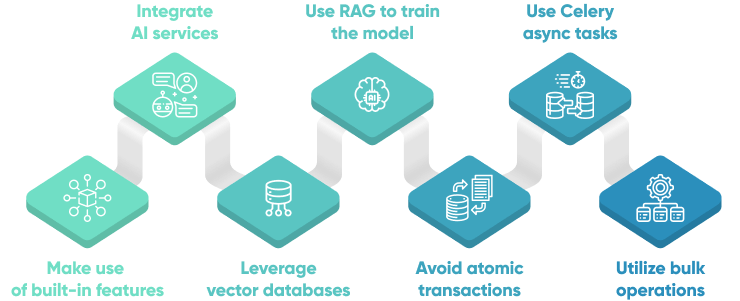
The 7 best practices for Django AI development are: use Django’s built-in product infrastructure, separate LLM orchestration from web request handling, choose the right vector database, ground answers with RAG, batch large imports safely, run heavy AI work asynchronously, and reduce database overhead with bulk operations.
How can Django’s built-in features speed up AI product development?
Django speeds up AI product development by providing the application infrastructure that every serious AI product needs before model quality becomes visible to users. Instead of creating user management, permissions, validation, and admin dashboards from scratch, AI teams can spend more time on retrieval quality, evaluation, and user workflows.
In production Django AI applications, SoftKraft typically uses:
- Django admin to review prompts, source documents, embedding jobs, inference logs, and failed background tasks.
- Django authentication and permissions to protect AI features that process customer records, internal documents, or regulated data.
- Django forms and serializers to validate user input before it reaches an LLM prompt, embedding model, or retrieval pipeline.
- Django URL routing and middleware to keep model endpoints, callbacks, and review workflows explicit.
- Django migrations and management commands to version data changes, rebuild indexes, and run controlled embedding backfills.
Key takeaway: Django is not just a web framework around an AI model. Django becomes the control plane for AI features that need governance, access control, and auditability.
How should Django integrate with LLM services and AI frameworks?
Django should integrate with LLM services through a dedicated application layer, not through ad hoc prompt strings inside views. The reliable pattern is to keep Django responsible for users, permissions, persistence, and API contracts, while orchestration code handles prompts, retrieval, model calls, evaluation, and fallbacks.
For many production systems, this means:
- Use Django REST Framework for stable API endpoints consumed by web, mobile, or internal tools.
- Use LangChain or LlamaIndex when the application needs chains, retrieval workflows, structured tools, agents, or document indexing.
- Use FastAPI microservices beside Django when the AI layer needs async streaming, high-throughput inference, or Server-Sent Events.
- Use Celery when model calls, embedding generation, and document processing can run outside the request-response cycle.
Treat prompt engineering as production engineering. Every Django AI project should include input validation, prompt injection controls, structured output parsing, rate limits, logging, and human review for high-risk outputs.
Here is a simplified Django view pattern for a RAG-enhanced query:
from django.http import StreamingHttpResponse
from rest_framework import serializers
from rest_framework.permissions import IsAuthenticated
from rest_framework.views import APIView

from myapp.services import build_rag_chain
from myapp.throttles import RagQueryThrottle


class RagQuerySerializer(serializers.Serializer):
    q = serializers.CharField(max_length=500, trim_whitespace=True)


class RagQueryView(APIView):
    permission_classes = [IsAuthenticated]
    throttle_classes = [RagQueryThrottle]

    def post(self, request):
        params = RagQuerySerializer(data=request.data)
        params.is_valid(raise_exception=True)
        chain = build_rag_chain(user=request.user)

        def stream():
            for token in chain.stream({"query": params.validated_data["q"]}):
                yield f"data: {token}\n\n"

        return StreamingHttpResponse(
            stream(),
            content_type="text/event-stream",
        )
This approach keeps Django thin at the view level and moves complex AI behavior into reusable services that can be tested, monitored, and improved independently.
Which vector database should a Django AI application use?
A Django AI application should use pgvector when PostgreSQL already powers the product and the embedding workload is moderate. The same application should use a managed vector database such as Pinecone when search scale, metadata filtering, hybrid search, or operational isolation becomes more important than keeping everything inside one database.
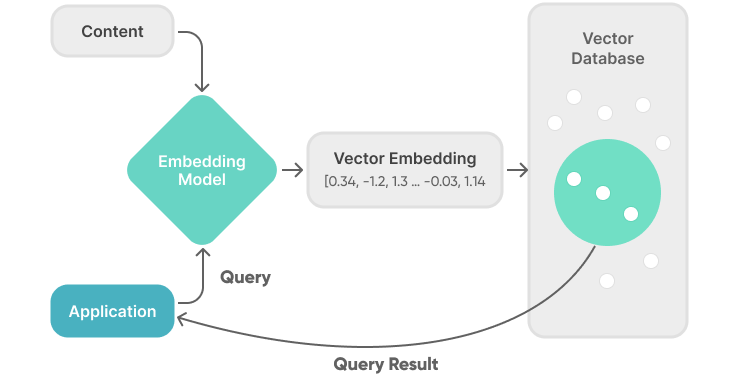
Vector databases store embeddings, which are numerical representations of documents, messages, products, or user behavior. In Django AI development, embeddings power semantic search, recommendations, duplicate detection, support automation, and Retrieval-Augmented Generation.
Option A: Start with PostgreSQL and pgvector
Connect to your PostgreSQL server as a superuser and execute the following command to install pgvector:
CREATE EXTENSION IF NOT EXISTS vector;
Then define a Django model for embeddings:
from django.db import models
from pgvector.django import HnswIndex, VectorField


class DocumentEmbedding(models.Model):
    source_id = models.CharField(max_length=100, unique=True)
    content = models.TextField()
    embedding = VectorField(dimensions=1536)
    metadata = models.JSONField(default=dict)

    class Meta:
        indexes = [
            HnswIndex(
                name="doc_embedding_hnsw",
                fields=["embedding"],
                m=16,
                ef_construction=64,
                opclasses=["vector_cosine_ops"],
            )
        ]
Insert vectors through the Django ORM (the embedding below is shortened for readability):
DocumentEmbedding.objects.create(
    source_id="policy-123",
    content="Refund policy for enterprise customers...",
    embedding=[0.012, -0.044, 0.091],
    metadata={"document_type": "policy"},
)
Search similar vectors with pgvector:
from pgvector.django import CosineDistance


def search_similar_documents(query_vector, limit=5):
    return (
        DocumentEmbedding.objects
        .order_by(CosineDistance("embedding", query_vector))
        .values("source_id", "content", "metadata")[:limit]
    )
Option B: Move to Pinecone for higher-scale retrieval
For larger RAG systems, Pinecone reduces the operational burden of index scaling, metadata filtering, and high-throughput retrieval:
from pinecone import Pinecone, ServerlessSpec
from django.conf import settings

pc = Pinecone(api_key=settings.PINECONE_API_KEY)

if "my-ai-index" not in pc.list_indexes().names():
    pc.create_index(
        name="my-ai-index",
        dimension=1536,
        metric="cosine",
        spec=ServerlessSpec(cloud="aws", region="us-east-1"),
    )

index = pc.Index("my-ai-index")


def upsert_embeddings(vectors):
    index.upsert(vectors=vectors)


def semantic_search(query_vector, top_k=5, filter=None):
    results = index.query(
        vector=query_vector,
        top_k=top_k,
        include_metadata=True,
        filter=filter
    )
    return results["matches"]
Key takeaway: pgvector is usually the fastest path for Django teams already on PostgreSQL. Pinecone is usually the cleaner path when embeddings become a separate retrieval product with its own scale, latency, and filtering requirements.
How does RAG make Django AI applications more reliable?
RAG makes Django AI applications more reliable by forcing the model to answer from retrieved business context instead of relying only on generic training data. This is critical for enterprise knowledge bases, EdTech platforms, customer support copilots, legal workflows, healthcare workflows, and internal automation systems.
The setup looks something like:
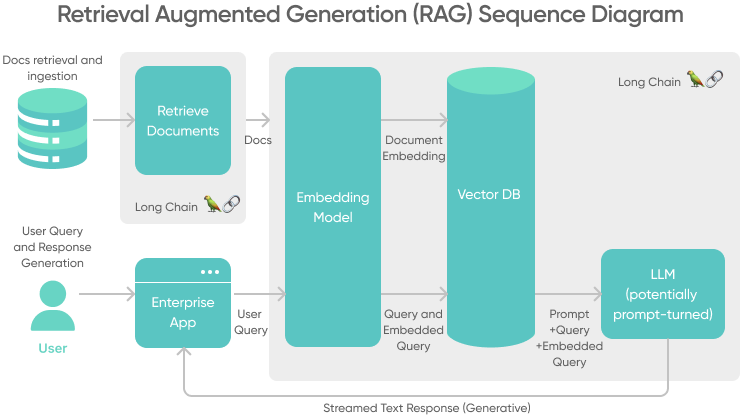
A production RAG pipeline in Django should include:
- Source ingestion: Import documents from CMS, Google Drive, Confluence, support systems, CRMs, or product databases.
- Chunking and metadata: Split content into retrievable units and preserve metadata such as source URL, author, timestamp, account, and access permissions.
- Embedding generation: Create embeddings in background jobs, usually with Celery.
- Retrieval: Query pgvector, Pinecone, or another vector database for relevant chunks.
- Prompt assembly: Build prompts that include retrieved context, user intent, safety rules, and output format.
- Citations and traceability: Return source links or document IDs so users can verify generated answers.
- Evaluation: Track retrieval precision, answer quality, hallucination risk, and user feedback over time.
Key takeaway: RAG turns Django from a simple model wrapper into a grounded AI application layer. The Django database remains the source of truth for users, permissions, documents, jobs, and review history.
How should Django load large AI datasets without blocking the database?
Django should load large AI datasets in small, restartable batches instead of wrapping millions of rows in one transaction. This matters for embedding backfills, training-data imports, historical support tickets, event logs, and model evaluation records.
For migrations or backfills, set atomic = False, process rows in batches, and make each batch idempotent:
from django.db import migrations, transaction


def import_people_records(apps, schema_editor):
    Person = apps.get_model("people", "Person")

    for batch in read_csv_file("people.csv", batch_size=1_000):
        with transaction.atomic():
            Person.objects.bulk_create(
                [
                    Person(name=row["name"], email=row["email"])
                    for row in batch
                ],
                batch_size=1_000,
                ignore_conflicts=True,
            )


class Migration(migrations.Migration):
    atomic = False
For very large AI imports, a management command is often safer than a migration because it can support progress checkpoints, retries, and explicit monitoring:
from django.core.management.base import BaseCommand

from myapp.models import SourceDocument


class Command(BaseCommand):
    help = "Import source documents for embedding generation."

    def handle(self, *args, **options):
        for batch in read_document_rows(batch_size=1_000):
            SourceDocument.objects.bulk_create(
                [
                    SourceDocument(
                        external_id=row["id"],
                        content=row["content"],
                        metadata=row["metadata"],
                    )
                    for row in batch
                ],
                batch_size=1_000,
                update_conflicts=True,
                update_fields=["content", "metadata"],
                unique_fields=["external_id"],
            )
Key takeaway: For AI data pipelines, restartability is more important than one perfect transaction that can lock or fail under production load.
Why should Django AI workloads run in Celery tasks?
Django AI workloads should run in Celery tasks because model calls, embedding generation, document parsing, and batch inference are usually too slow or unpredictable for a web request. Celery keeps the Django application responsive while workers process long-running AI jobs.
Common Celery workloads in Django AI development include:
- Generating embeddings after a document upload.
- Rebuilding a vector index after content changes.
- Running nightly model evaluations.
- Processing long transcripts, PDFs, or CSV files.
- Storing batch inference results.
- Retrying failed provider calls with backoff.
Here is a simplified task for embedding source documents:
import openai
from celery import shared_task
from django.db import transaction

from myapp.embeddings import embed_texts
from myapp.models import SourceDocument, DocumentEmbedding


@shared_task(
    autoretry_for=(openai.APITimeoutError, openai.RateLimitError),
    retry_backoff=True,
    retry_backoff_max=600,
    retry_jitter=True,
    max_retries=3,
)
def generate_embeddings(document_ids):
    documents = list(SourceDocument.objects.filter(id__in=document_ids))
    vectors = embed_texts([document.content for document in documents])

    with transaction.atomic():
        DocumentEmbedding.objects.bulk_create(
            [
                DocumentEmbedding(
                    source_id=document.external_id,
                    embedding=vector,
                    metadata=document.metadata,
                )
                for document, vector in zip(documents, vectors)
            ],
            batch_size=500,
            update_conflicts=True,
            update_fields=["embedding", "metadata"],
            unique_fields=["source_id"],
        )
For full setup details, use the Celery documentation for Django.
Key takeaway: In Django AI systems, Celery is not a nice-to-have. It is the boundary that prevents AI latency from becoming web latency.
How can bulk operations improve Django AI performance?
Bulk operations improve Django AI performance by reducing the number of database round trips during ingestion, inference logging, evaluation, and recommendation updates. This is especially important when an AI feature generates thousands of rows per job.
Use bulk operations for:
- Embedding imports: Save document vectors in batches instead of one row at a time.
- Batch inference results: Store thousands of predictions after one model run.
- Evaluation datasets: Insert prompts, expected answers, model outputs, and scores in controlled batches.
- Monitoring events: Aggregate high-volume LLM logs before writing to the database.
- Recommendation refreshes: Update ranking scores or candidate lists in bulk.
The core Django tools are bulk_create, bulk_update, update_or_create, and get_or_create. For high-volume AI systems, combine these methods with database indexes, query profiling, and explicit batching.
Key takeaway: AI features often create more database writes than traditional CRUD applications. Bulk operations keep the Django database predictable under that load.
How does SoftKraft approach Django AI development?
SoftKraft, a Poland-based Python and AI software development house at softkraft.co, builds Django AI applications for teams that need production reliability, not only a working prototype. Our engineering approach combines Python backend architecture, Django application development, LLM integration, RAG pipelines, vector databases, cloud infrastructure, and delivery practices shaped for B2B software teams.
SoftKraft can help with:
- AI product discovery and architecture.
- Django and FastAPI backend development.
- RAG implementation for company-specific knowledge.
- Vector database setup with pgvector, Pinecone, or other retrieval systems.
- LLM integration with providers such as OpenAI, Anthropic, and cloud AI platforms.
- AI security guardrails, observability, and human review workflows.
- Production rollout, monitoring, and iteration after launch.

What is the practical conclusion for Django AI development?
The practical conclusion is that Django AI development works best when Django owns the product backbone and specialized AI components own model execution, retrieval, and orchestration. Django 5.2 LTS, Django REST Framework, Celery, pgvector or Pinecone, RAG, structured outputs, and strong security controls create a stack that can move from prototype to production without a rewrite.
For CTOs and product leaders, the main decision is not whether Django can call an AI model. Django can do that easily. The main decision is whether the AI application needs secure users, business data, reviewability, repeatable background jobs, and long-term maintainability. If the answer is yes, Django is one of the strongest Python frameworks for building production AI software.