

7 Practical Steps to Use Django for Business Software Development
Quick Answer: Django is a strong choice for business software when a company needs a secure Python backend, a reliable PostgreSQL data layer, fast admin workflows, and APIs that can later connect to AWS services, analytics pipelines, AI modules, or B2B integrations. The safest path is to define requirements, model data carefully, separate domain logic, test critical flows, and deploy with CI/CD, observability, and security controls.
According to JetBrains’ 2025 overview of popular Python frameworks and libraries, Django remains one of the most widely used Python web frameworks: 35% of surveyed Python developers reported using it in 2024. For CTOs, founders, and COOs, the important point is not popularity alone. Django gives teams a mature framework for transactional systems, internal platforms, B2B portals, workflow automation, and data-heavy applications where security, maintainability, and integration speed matter.
Having led more than ten Django projects for enterprise clients across diverse industries, we’ve seen Django work best when it is paired with disciplined requirements analysis, explicit architecture boundaries, deliberate database design, automated testing, and cloud deployment practices.
This guide explains seven practical steps for using Django in business software development, from defining requirements to testing and deployment. It also shows where Django fits in a broader Python and AWS ecosystem: PostgreSQL, Django REST Framework, Celery, Redis, S3, RDS, CloudWatch, OCR/IDP pipelines, analytics workflows, and compliance-ready audit trails. Think of use cases such as an invoice approval workflow, a customer portal with document upload, or an internal operations platform that must connect CRM, ERP, and reporting data.
- Why do CTOs choose Django for business software?
- 7 practical steps to use Django for business software development
- What challenges should businesses expect when using Django?
- When is Django the right choice compared with a custom backend or AI-first architecture?
- Conclusion
- Optional technical appendix: start a local Django project
Why do CTOs choose Django for business software?
Django is often a practical choice when a business application needs to move quickly without sacrificing control over data, security, and long-term maintenance. As a high-level Python framework, Django gives teams a predictable foundation for products that combine business workflows, user permissions, reporting, integrations, and custom domain logic.
- Fast delivery with fewer moving parts: Django includes an ORM, authentication, migrations, admin panel, routing, forms, middleware, and templating, so the team can focus on business workflows instead of rebuilding basic platform features.
- Python ecosystem compatibility: Django fits naturally with Python tools used for analytics, OCR, intelligent document processing, machine learning, and automation, including Pandas, Scikit-learn, PyTorch, TensorFlow, Tesseract OCR, AWS Textract, and LLM integration layers.
- Strong data modeling: Django’s ORM, migrations, constraints, and PostgreSQL support help teams design clear data structures for orders, invoices, permissions, payments, documents, audit logs, and reporting.
- Security-by-default posture: Django provides protections against common web risks such as SQL injection, XSS, CSRF, and clickjacking when teams use its ORM, template autoescaping, and security controls as intended. It still needs secure engineering practices around raw SQL, unsafe HTML, permissions, secrets, and third-party dependencies.
- Cloud-ready deployment: Django can run on AWS Elastic Beanstalk, ECS, EKS, EC2, or containerized platforms with RDS, ElastiCache, S3, CloudFront, Secrets Manager, and CloudWatch. When part of the workload is event-driven, Django can also coordinate with AWS Lambda, SQS, EventBridge, or Step Functions.
- Practical ROI: Django often reduces delivery risk for B2B systems because core features, admin operations, authentication, and data access patterns are standardized rather than invented per project.
7 practical steps to use Django for business software development
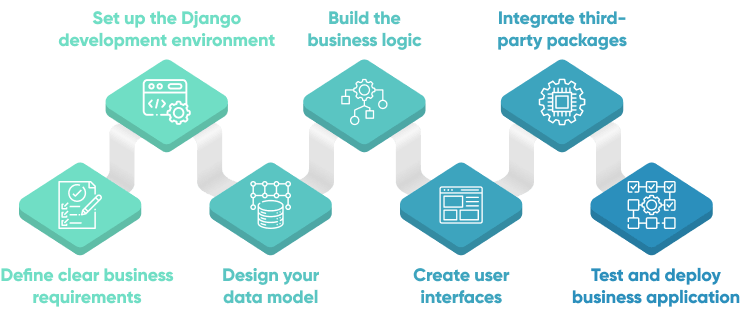
Django delivers the most value when the delivery process treats architecture, security, and operations as first-class concerns from the beginning. These seven steps reflect the workflow we use for business applications where stakeholders care about delivery speed, compliance exposure, operating cost, and future scalability.
Define clear business requirements
Before writing code, define the business process, users, data, permissions, integrations, and operating constraints that the Django application must support. Django is flexible, but flexibility only helps when the product team understands the concrete business workflow: for example, approving invoices, onboarding customers, processing claims, managing partner access, or preparing structured data for future AI features.
In our projects, requirements workshops bring together business users, product owners, domain experts, and engineers. These sessions translate business goals into functional requirements, non-functional requirements, integration assumptions, compliance constraints, and measurable success criteria such as cycle-time reduction, lower manual error rate, faster onboarding, or reduced support workload.
The key output is a business requirements document that explains why custom Django software is justified instead of an off-the-shelf tool. We usually prioritize functionality with the MoSCoW method:
- Must have: non-negotiable requirements
- Should have: important but not critical
- Could have: nice-to-have if time allows
- Won't have: explicitly out of scope for this iteration
For a Django business application, the requirements document should also cover:
- Data ownership: which entities, documents, logs, and reports the system must store.
- Security model: roles, permissions, SSO, tenant isolation, and audit requirements.
- Integration scope: ERP, CRM, payment systems, OCR engines, IDP pipelines, third-party APIs, or internal microservices.
- Compliance requirements: GDPR, SOC 2 readiness, ISO 27001 practices, HIPAA-like controls, financial auditability, or industry-specific data retention.
- ROI assumptions: what cost, delay, error rate, or operational risk the application should reduce.
PRO TIP: Interview the people currently performing the process, not only executives sponsoring the project. Operators using spreadsheets, legacy systems, shared inboxes, or manual approval flows usually reveal the real edge cases that shape the Django domain model.
Read More: 7 Key Elements of Effective Software Requirements Specification
Establish the architecture and delivery foundation
Before implementation accelerates, establish the technical baseline for a reproducible delivery process. Business software usually has multiple developers, QA environments, staging databases, third-party credentials, background workers, and production-parity requirements. The goal is to make local, staging, and production behavior predictable.
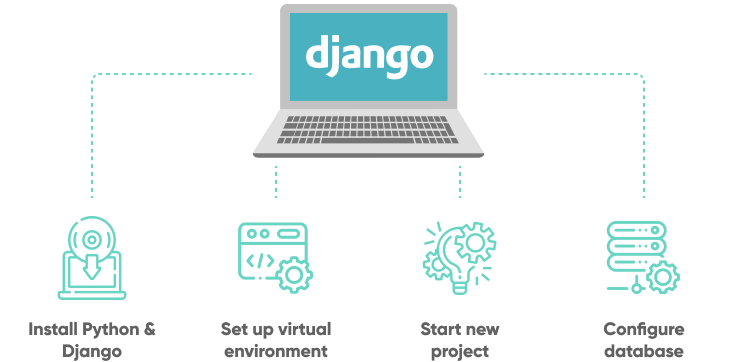
Make early decisions about the supported Python and Django versions, PostgreSQL as the production data store, dependency tooling (pip, Poetry, or uv), configuration management, secrets, and the separation of local, staging, and production settings. These decisions should also cover API boundaries, authentication and authorization, asynchronous work, observability, and the services the application will depend on.
Use version-controlled environment definitions, database seed data, pre-commit checks, and a clear split between settings/local.py, settings/staging.py, and settings/production.py. This gives the team a foundation that can be reviewed, repeated, and audited instead of relying on undocumented developer-machine setup.
PRO TIP: When the project includes PostgreSQL, Redis, Celery workers, browser tests, or multiple developers, define the development stack with Docker Compose from day one. The composition should include the web application and each service it needs—not only a Dockerfile for the Django process.
Design your data model
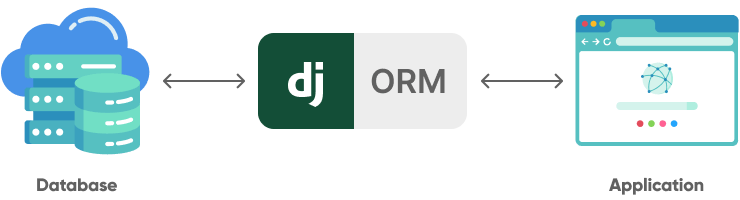
Designing the data model is one of the highest-leverage decisions in a Django project. A weak model creates slow queries, fragile permissions, reporting gaps, and migration risk. A strong model makes the application easier to extend when the business adds new workflows, integrations, analytics, or AI automation.
Plan the database structure
Map entities, relationships, state transitions, indexing needs, retention rules, and growth patterns before writing code. For B2B systems, the model often needs explicit concepts such as organizations, accounts, users, roles, audit events, documents, approvals, billing objects, and integration records.
Define models in Django
Models in Django represent database tables and business entities. A simple example:
from django.db import models

class Product(models.Model):
    name = models.CharField(max<ElementPlaceholder index="17" />digits=10, decimal<ElementPlaceholder index="18" />at = models.DateTimeField(auto<ElementPlaceholder index="19" />add=True)
    updated<ElementPlaceholder index="20" />now=True)
Production models should go further than simple fields. Use database constraints, indexes, select_related(), prefetch_related(), explicit choices/enums, transaction boundaries, and migration plans for high-volume tables. When financial, healthcare, or regulated data is involved, design audit trails and retention policies at the same time as the core model.
PRO TIP: Use Django’s ORM for maintainability, but do not treat ORM queries as automatically efficient. Review query plans for critical screens, add indexes intentionally, and monitor N+1 queries before traffic grows.
Build the business logic
Business logic should be explicit, testable, and separated from presentation code. Django projects become hard to maintain when core rules are scattered across views, serializers, signals, templates, and admin overrides. For business software, define where domain logic lives before feature velocity increases.
Model use cases, not screens
Start with the business actions that change the state of the system: approve an invoice, grant partner access, submit a claim, or process an uploaded document. Keep their validation, authorization, transaction boundaries, and audit events in service functions, domain services, command handlers, or a dedicated application layer. This lets web views, APIs, background workers, and admin tools call the same rules without duplicating them.
Make failure handling part of the design
For each critical workflow, define what happens when an integration is unavailable, a task runs twice, a user retries an action, or a downstream event is delayed. Use transactions where data must change together, and make external operations idempotent so retries do not create duplicate payments, documents, or notifications.
Keep asynchronous work out of requests
Keep inference, OCR, IDP, report generation, and other long-running jobs outside synchronous request handling. Use a task queue such as Celery with Redis or RabbitMQ, persistent job-status models, retries, and operational visibility so users can follow processing safely.
PRO TIP: Review business logic at the use-case level. A useful review asks whether a workflow enforces permissions, preserves data integrity, records the required audit evidence, and remains safe if it is retried.
Read More: 7 Proven Best Practices to Master Django AI Development
Create user interfaces
Django supports several UI strategies, and the best option should follow the actual user workflow rather than a generic technology preference. Server-rendered Django templates are often enough for internal systems, approval flows, dashboards, and admin-adjacent workflows. React, Vue, or another frontend framework makes more sense when the product needs a rich interface, mobile-like interactions, real-time updates, or a separate frontend team.
Key strategies we use when creating UIs for business software:
- Use Django templates for low-complexity portals, internal tools, and workflows where server-side rendering keeps maintenance simple.
- Use Django REST Framework when the frontend is built in React, Vue, mobile, or another client consuming APIs.
- Apply design systems with Tailwind, Bootstrap, or component libraries to reduce UI inconsistency.
- Prioritize accessibility with WCAG-aligned navigation, forms, labels, keyboard flows, and error states.
- Design for operational clarity with role-aware navigation, audit-friendly screens, and clear status messages for background jobs.
Views should remain thin adapters: they authenticate the request, validate input, invoke a use case from the business layer, and return a response. Map those views deliberately in urls.py and keep templates focused on presenting data rather than implementing business rules.
PRO TIP: Use Django admin for trusted internal data administration and simple operational tasks. Build dedicated interfaces for core business workflows, customer-facing journeys, or actions requiring tailored permissions, validations, and audit evidence.
Read More: UI Design Process - 7 Easy Steps to Make Great UIs Faster
Implement selected packages and integrations
The Django ecosystem is one of the main reasons Django works well for business software. Select foundational dependencies during the architecture stage, then implement them alongside the workflows that need them. Adding authentication, APIs, asynchronous processing, or storage after the core UI is built creates avoidable rework.
A few packages we rely on regularly:
- Django Guardian: Fine-grained, object-level permissions with minimal boilerplate.
- Celery: Asynchronous task queues with Redis or RabbitMQ for emails, reports, file processing, OCR, AI inference jobs, and integrations.
- Wagtail CMS: Powerful, customizable content management for content-rich applications.
- Django Filter: Filtering of querysets via URL parameters.
- Sentry: Production monitoring and error tracking.
- django-allauth: Authentication flows for email, social login, and account management.
- django-storages: Storage integration with S3-compatible object stores.
PRO TIP: Treat third-party packages as supply-chain dependencies. Check maintenance activity, release history, license, security posture, and compatibility with the Django version before building business-critical workflows around a package.
Build quality and operations in from the start
Quality and operations are not a final sequential stage. Start them with the first production-relevant workflow so the application has automated tests, review environments, repeatable migrations, monitoring, and clear incident ownership before production traffic begins.
Establish a comprehensive testing strategy
Django’s built-in test runner and TestCase classes provide a good foundation for unit and integration testing. For larger products, pytest-django improves developer experience through fixtures and plugins, while factory_boy helps generate realistic model data for complex workflows.
We cover:
- Unit testing of models, views, and forms.
- Integration testing of APIs, permissions, background workers, storage, and third-party services.
- Functional and end-to-end testing for complete user workflows.
- Performance testing for slow endpoints, large tables, report generation, and background processing.
- Security testing for authentication, authorization, object-level permissions, secrets, and file access.
Plan delivery and operations
Plan deployment around the operating model. A common production setup uses Gunicorn or uWSGI behind Nginx, PostgreSQL on RDS or a managed equivalent, Redis for cache and Celery, object storage for files, and CI/CD for migrations and releases. On AWS, teams often combine ECS or EKS, RDS, ElastiCache, S3, CloudFront, Secrets Manager, CloudWatch, and Sentry or OpenTelemetry-based observability.
Deployment planning should also include:
- Database migrations: forward-only migrations, rehearsed backups, and a tested recovery plan. If a migration causes a problem, the usual response is to deploy a corrective migration or restore data where necessary—not to reverse a production schema blindly.
- Secrets management: no credentials in code or environment files committed to Git.
- Observability: logs, traces, metrics, alerting, and error budgets for critical flows.
- Compliance evidence: access logs, deployment records, vulnerability scans, and change approvals when the business operates in regulated markets.
- Cost control: right-sized infrastructure, autoscaling policies, cache strategy, and background job limits.
PRO TIP: Put tests, linting, dependency checks, migrations, and deployment previews into CI/CD. This gives stakeholders better release predictability and lowers the risk of regression in business-critical workflows.
- N+1 query problems: Allowing list views, dashboards, or API endpoints to fetch related data per row instead of measuring query counts and query plans under realistic load.
- Inadequate migration planning: Treating complex schema changes lightly instead of rehearsing them against representative data and defining recovery actions.
- Poor app structure and separation of concerns: Letting business rules leak into views, serializers, signals, templates, or admin overrides instead of maintaining clear domain boundaries.
- Over-reliance on the Django admin: Extending an internal administration tool into a primary business workflow without a purpose-built user experience and appropriate controls.
- Weak permission modeling: Adding role checks late instead of designing roles, object-level access, tenant boundaries, and audit requirements from the beginning.
What challenges should businesses expect when using Django?
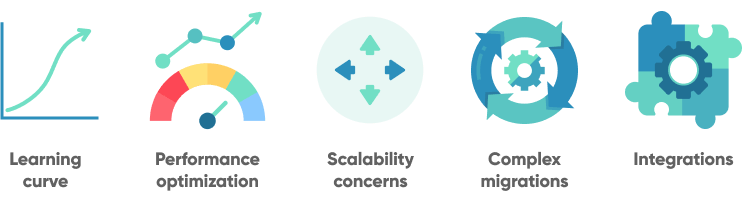
Even with Django’s strengths, teams should plan for predictable challenges:
- Learning curve: Django’s conventions, ORM, middleware, settings, migrations, and app structure take time to master.
- Performance optimization: High-traffic systems need query optimization, caching, pagination, async workers, and database monitoring.
- Scalability decisions: Scaling Django usually means designing clear boundaries around database access, cache layers, task queues, and stateless web workers.
- Complex migrations: Schema changes require representative test data, backups, migration rehearsal, and a tested recovery plan.
- Integrations: ERP, CRM, payment, AI, OCR, and legacy system integrations need idempotency, retries, observability, and clear failure handling.
- Security and compliance: B2B buyers expect evidence of access controls, secure SDLC practices, vulnerability management, data retention, and incident response.
When is Django the right choice compared with a custom backend or AI-first architecture?
Django is a strong default when the product has structured data, authenticated users, administrative workflows, business rules, and integration needs. A custom lightweight backend may be better for a small API with narrow scope. A specialized AI-first architecture may be necessary when the core workload is model orchestration, vector search, streaming inference, or high-volume data processing.
For many business applications, the practical answer is a hybrid. Django handles users, permissions, workflows, APIs, billing, audit trails, and operational screens. Separate services or workers handle AI inference, OCR, IDP processing, data pipelines, or event-driven workloads. In practice, this could mean Django manages the customer portal and review queue, while Celery workers process uploaded documents and an AWS Textract pipeline extracts invoice or contract data in the background. This pattern keeps the business system stable while still allowing the company to add AI or automation capabilities.
Related Django and Python resources:
- 7 Proven Best Practices to Master Django AI Development
- 12 Pros & Cons of Using Django for Startups: 2026 Guide
- Python Development Company
Conclusion
Use Django for business software when the application needs a reliable Python backend, structured data, secure user management, admin operations, integrations, and room for future analytics or AI capabilities. The framework is mature, but project success still depends on clear requirements, strong data modeling, clean architecture, automated tests, and production-grade deployment practices.
If you are evaluating Django for a B2B product, internal platform, workflow automation system, or AI-enabled application, SoftKraft’s Python development team can help validate the architecture, define the delivery roadmap, and build a production-ready Django system with security, scalability, and maintainability designed from the start.
Optional technical appendix: start a local Django project
The main guide focuses on delivery and architecture decisions. Developers who need a minimal local starting point can use the following commands after agreeing the project’s supported Python version and dependency tooling:
python -m venv .venv
source .venv/bin/activate
pip install django
django-admin startproject my_django_project
cd my_django_project
python manage.py migrate
python manage.py runserver
For a production project, replace the default local SQLite setup with PostgreSQL, record dependencies in requirements.txt or pyproject.toml, and use pip, Poetry, or uv to install and manage them. Do not place production credentials in committed environment files.