
How to Build an AI Product in 2026 — 12 Dos and Don'ts
Quick Answer: To build an AI product in 2026, validate a narrow workflow first, design the architecture around data quality, retrieval, evals, security, and observability, then choose models and frameworks. Production-grade AI products usually combine RAG, versioned prompts, human oversight, cloud infrastructure, and measurable ROI instead of relying on one powerful LLM.
In 2024, the question was whether to build with AI. That’s settled. In 2026, the question is how to build an AI product that reaches production, survives real users, and remains maintainable after model providers change APIs, pricing, context windows, or safety behavior.
The failure modes have shifted with it. It’s no longer “can the model do this?” It’s “which architecture survives real usage, silent model updates, data-quality gaps, and the next wave of tooling?” Capability is no longer the bottleneck. Production reliability, clear ownership of data, and the right AI architecture are.
The 12 do’s and don’ts below reflect what is breaking AI products today: weak retrieval pipelines, missing eval harnesses, unmanaged cloud costs, poor security boundaries, and framework complexity adopted before the workflow is proven. This matters because adoption is no longer the hard part: McKinsey’s 2025 State of AI report found that nearly nine out of ten surveyed organizations use AI, while many still struggle to move from pilots to scaled enterprise value.
What Are the Key Challenges in Building AI Systems?
Artificial Intelligence (AI) product development now fails less often because of model capability and more often because teams underestimate the engineering system around the model. A production AI product needs a data layer, orchestration logic, security controls, human review paths, observability, and a cost model that still works after usage scales.
- Selecting the right workflow where AI can improve throughput, quality, or decision speed without creating unacceptable operational risk.
- Safeguarding user data with tenant isolation, least-privilege access, audit logs, encryption, and clear policies for model-provider data handling.
- Sourcing high-quality data from CRM, ERP, document repositories, product telemetry, data warehouses, or OCR / IDP pipelines before adding retrieval or fine-tuning.
- Making model behavior testable through eval datasets, versioned prompts, regression tests, and model observability rather than relying on demos.
- Managing compliance and governance for B2B use cases that touch PII, financial data, healthcare data, intellectual property, or regulated workflows.
For CTOs, founders, and COOs, the practical question is not “which LLM is best?” The practical question is: which AI architecture can produce a measurable ROI, integrate with the existing AWS / Python ecosystem, and remain compliant when usage moves from pilot to production? In the IBM Cost of a Data Breach Report 2025, 63% of breached organizations lacked AI governance policies, which is why access control and oversight belong in the product plan from day one.
How Should You Build an AI Product? 6 Dos

Refine your AI product concept
Before choosing a model, refine the AI product concept into a narrow, testable workflow. The best AI use cases usually have clear inputs, visible quality criteria, and a measurable business outcome such as faster document processing, lower support effort, shorter onboarding, fewer manual reviews, or higher conversion.
First, the AI product should be truly valuable to users.The first thing to consider when refining your AI product concept is the value it brings to users - whether internal business users or external customers. Ask yourself: What decision, task, or document flow will improve because AI is involved? A strong answer is usually practical: “support agents resolve tickets faster,” “analysts review contracts with fewer missed clauses,” or “operations teams process documents with less manual rework.” Use these criteria:
- Integration and practicality: Map the workflow to existing systems such as Salesforce, HubSpot, Zendesk, Slack, Google Workspace, SharePoint, Snowflake, PostgreSQL, or internal Django / FastAPI applications.
- Efficiency and automation: Estimate time saved per workflow, expected adoption, review effort, inference cost, and support cost before treating AI as a product feature.
- Personalization: Use account, role, permission, and behavioral context carefully; personalized AI must still respect data-access boundaries.
- Anticipation: Let AI suggest next actions only where the system has enough context and the user can accept, reject, or edit the recommendation.
Trust is a cornerstone of any successful AI product. It’s not enough to have a strong demo. To earn user confidence, choose a use case where accuracy can be tested, improved, and explained through source citations, confidence scores, human review, or deterministic business rules.
The level of accuracy you can achieve largely depends on the data you have access to. Be thoughtful about how data limitations might impact your product's performance. Achieving high accuracy is typically easier in narrow, well-defined business applications with abundant high-quality, specific data.
Conversely, wide applications may require extensive training data and face greater challenges in maintaining accuracy. In general, start with artificial narrow intelligence: one workflow, one user group, one data domain, and one measurable outcome. For adjacent product strategy, read our guide to building an MVP before turning an AI proof of concept into a full platform.
Read More: AI Project Management Guide

Evaluate data availability and quality
Data quality is the main constraint when you build an AI system. Early in the project, create a short data plan that answers five questions: where the data lives, who can access it, how fresh it is, how reliable it is, and how it will reach the AI workflow.
First let’s talk about the scale of data.For most business applications, you won’t be building an AI model from scratch. You’ll likely use current frontier or open-weight model families from providers such as OpenAI, Anthropic, Google, Meta, Mistral, or equivalent providers available when you build.
So, when we talk about the scale of data, it’s usually about what business data you need to augment these LLMs. In practice, this might mean embeddings, vector databases, semantic search, data warehouse access, document chunking, OCR, intelligent document processing (IDP), or a RAG layer over internal knowledge.
Now, consider where you will source your data.There are many options to consider, including:
- Data your product already has: Existing product data in PostgreSQL, Elasticsearch, event streams, object storage, or CRM records can be valuable, but it usually needs cleansing, normalization, deduplication, and permission-aware access.
- Documents and unstructured data: Contracts, invoices, tickets, PDFs, scanned forms, and knowledge-base articles may require OCR engines, layout extraction, metadata enrichment, and IDP workflows before an LLM can use them reliably.
- Automated data collection: Scraping and API-based collection can help, but teams need provenance, licensing checks, freshness rules, and data-quality monitoring.
- Purchased datasets: Third-party datasets can accelerate development, but vendor terms, bias, coverage, update frequency, and compliance fit must be reviewed before production use.
Example: A contract lifecycle management product is a practical AI workflow because the data, user task, and ROI are easy to define. SoftKraft’s [Contract Lifecycle Management Solution](https://www.softkraft.co/contract-lifecycle-management-solution/) was built with Python / Django, React, AWS services, and cloud AI-based OCR. In that pattern, uploaded contracts move through OCR and document parsing, extracted clauses and dates are checked against business rules, uncertain results go to a human review queue, and approved data supports supplier negotiation or contract operations. For an AI product team, the next layer could be RAG over approved contract knowledge, evals for extraction accuracy and answer grounding, audit logs for compliance, and ROI tracking based on manual review time saved, exception rate, and contract cycle-time reduction.
PRO TIP: Treat data readiness as a product risk, not a cleanup task. For AI features that depend on internal knowledge, assess freshness, completeness, access permissions, duplication, source authority, and conflict resolution before selecting a vector database or orchestration framework. For cost planning, see our AI development cost guide.
Carefully weigh AI technology tradeoffs
When building your own AI system, you will encounter various trade-offs that need to be carefully considered:
- Accuracy vs. Speed. Balancing the level of accuracy with the time taken to process AI algorithms.
- Complexity vs. Simplicity. Striking a balance between the complexity of AI models and their ease of understanding and maintenance
- Explainability vs. Performance. Balancing the interpretability of AI models with their performance and accuracy.
- Your use case requirements. Do you need the model to run within your environment? Do you need a larger context window? Are you using a language other than English?
Selecting the right AI technology is a pivotal decision, and in 2026 it comes down to five decisions that matter more than any specific model choice:
- Frontier API vs. open-weights. Use frontier APIs when speed to market matters and data residency is not a constraint. Open-weight models fit when you need on-premises deployment, fine-tuning control, or more predictable inference costs at scale.
- Standard vs. reasoning models. Use reasoning models for tasks that need multi-step logic, planning, code generation, or complex tool use. Use smaller or standard models for high-volume tasks such as classification, summarization, extraction, routing, and rewriting when evals show the quality is sufficient.
- General-purpose vs. fine-tuned. Fine-tuning is still worth it for consistent format or style adherence and domain-specific vocabulary. For many B2B use cases, prompt engineering plus RAG is a lower-risk first step because company knowledge can stay in governed data stores instead of being baked into model weights.
- Managed cloud vs. self-hosted inference. AWS Bedrock, Azure OpenAI, and Google Vertex AI simplify governance and procurement; self-hosted inference can make sense when latency, data residency, or unit economics justify the operational burden.
- Python-first vs. mixed-stack architecture. Python remains strong for AI workflows, evals, and data pipelines, while Django, FastAPI, React, and Node.js often shape the surrounding product experience and integration layer.
PRO TIP: Use an AI model abstraction layer, such as LangChain, when your workflow genuinely needs provider routing, tracing, tools, retries, or agent orchestration. This matters in two directions: across providers to avoid lock-in and across model tiers within a single workflow. For agentic systems, see our guide to LangChain agents. As a pricing example, Azure OpenAI pricing has shown materially different per-token costs between smaller general models and reasoning models. Treat those differences as an architecture input: route simple, high-volume work to cheaper models when evals prove the result is good enough, and reserve expensive reasoning for tasks that truly need it.
Choose the right AI model optimization strategy
While AI models are trained on a great deal of data, they are not trained on your business data, which may be private or specific to the problem you’re trying to solve. Each generative AI model optimization strategy has its unique strengths:
- Model training: Involves building an AI model from scratch, requiring significant data and computational resources (not to mention technical data science and programming language skills). The process to develop AI models is highly customizable and scalable but time-consuming to gather data and train from the ground up.
- Fine-tuning: Focuses on adapting an existing model to a specific task, offering a balance between customization and efficiency.
- Retrieval-augmented generation (RAG): Enhances models by integrating external knowledge sources, ideal for tasks needing current or company-specific information.
- Prompt engineering: Relies on crafting effective prompts to guide pre-trained models, requiring skill in prompt design but minimal computational resources. This method is not only cost-effective but also highly effective, yet its potential is frequently underestimated.
The most appropriate AI model optimization strategy depends on data availability, computational resources, task specificity, freshness needs, security constraints, and the team’s ability to maintain the system after launch. In regulated B2B environments, RAG with source-level permissions is often safer than fine-tuning on sensitive data because access rules can remain outside the model.
Read More: Differences between Langchain & LlamaIndex
Embrace an iterative development process
Embracing an iterative development process is not just a recommendation but a fundamental necessity when working with AI products, as they often lack a definitive "right" solution from the outset. Unlike traditional software development, where it is often possible to plan and scope the project in advance, AI projects require a dynamic approach that involves exploring multiple iterations and proof of concepts (PoCs) to uncover the most optimal solution.
Even after you have a working concept, continue to refine the AI product on four fronts. This makes iteration easier to manage for product and operations leaders, not only for engineers:
- AI-enhanced UX: Refine prompts, citations, review states, fallback messages, and control points so users know when the AI is confident and when human judgment is needed.
- Model performance: Track task success rate, precision, recall, hallucination rate, latency, token cost, and escalation rate instead of relying on subjective output quality.
- Data refinement: Improve chunking, metadata, deduplication, permission filters, and source ranking as real usage exposes retrieval gaps.
- Feature expansion: Expand from one workflow to adjacent workflows only after the first workflow has stable eval scores, telemetry, and support processes.
PRO TIP: Building AI products requires ongoing maintenance, data updates, and fine-tuning to adapt to changing environments. Companies that treat AI as a one-time project instead of an ongoing initiative often find that their systems become obsolete or ineffective.
Plan to adopt a continuous improvement mindset when it comes to AI. Regularly monitor, update, and fine-tune your AI systems to keep them relevant and accurate as situations and data change.
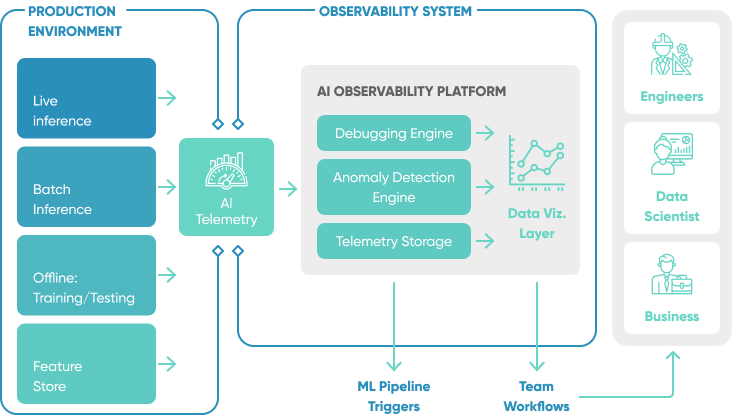
[WhyLabs](https://docs.whylabs.ai/docs/) is an observability platform designed to monitor data pipelines and ML applications for data quality regressions, data drift, and model performance degradation. Built on top of an open-source package called whylogs.
Design with usability in mind from the start
A successful AI product depends on a user experience that is clear, controllable, and trustworthy. Users need to understand what the AI used as context, why the answer was produced, how to correct it, and when the system is asking for human judgment.
Consider the following questions as you begin to develop or enhance your AI solution:- What type of user interaction will best suit your AI product - chat interface, embedded workflow assistant, document review screen, voice interface, or a structured UI with buttons and menus?
- How much control do you want to give users over their interactions with AI?
- Should users have the ability to customize settings and preferences?
- Will there be human staff or users acting as "checks" on the AI's outputs and decisions?
- When and how frequently should the AI prompt users for input or guidance?
- How can you design prompts and questions that are contextually relevant and feel natural within the user's workflow or conversation?
- What features can you provide to enable users to manage their interactions, review past interactions, or adjust their preferences?
- How will the AI tool handle errors, low-confidence retrieval, missing permissions, ambiguous requests, or unsafe user input?
PRO TIP: Incorporate user-friendly mechanisms that invite users to provide feedback on the AI's behavior. Whether through ratings, comments, or direct interactions, these channels offer valuable insights. Combine user input with the analysis of real user behavior to guide iterative enhancements to the user experience.
Read More: [Designing for AI: 12 Expert Tips for Human-Centered Design](/designing-for-ai/)
What Should You Avoid When Building an AI Product? 6 Don’ts
Recognize the decisions that undermine AI development before production. The six “don’ts” below protect product teams from common failure modes: weak oversight, premature framework selection, missing validation, unmanaged scalability, and outdated architecture assumptions.

Ignore the need for human oversight
Human involvement is essential in overseeing AI systems, checking their work, and facilitating continuous improvement. By thoughtfully integrating humans into the AI workflow, product teams improve trust, reduce operational risk, and meet B2B governance expectations.
- Be clear about what the AI can and can’t do: One of the cornerstones of responsible AI is transparency. Clear communication is essential for setting realistic expectations, guiding users on interacting with the AI, avoiding misunderstandings, and preventing misuse.
- Prioritize user onboarding and feedback: Include information about the AI's abilities and limits during user onboarding using interactive tutorials or guided tours. If the AI can't perform a requested action, provide clear feedback and, if possible, suggest an alternative.
- Identify key points in the AI workflow where human intervention and oversight are essential. Humans should review high-impact outputs, exception cases, compliance-sensitive decisions, and low-confidence recommendations before the system takes action.
Choose tools before validating the workflow
The trap is reaching for LangGraph, CrewAI, AutoGen, or a multi-agent framework because the framework looks production-ready, before proving the underlying workflow works at all. Framework complexity hides whether the idea is sound. Teams spend weeks wiring orchestration on top of a workflow that was never going to work in the first place.
Validate with the simplest possible code first: direct API calls, minimal state, no abstraction. If the workflow does not produce useful output in 50 lines of code, an orchestration framework will not fix it.
Reach for tooling once the workflow is proven and you need:
- Persistent state across steps
- Parallel execution
- Structured retry logic
- Observability into a multi-step chain
- Tool calling, permissions, and audit logs that are too complex for a single prompt / response flow
Prove the added complexity actually improves outcomes. Many teams validate that a framework “works” end to end but never check whether the result is better than a single well-crafted prompt or a two-step chain. “Everyone is using it” is not a reason.
PRO TIP: Start with a single-file prototype. The moment you cannot explain the workflow without referencing the framework’s internals, you have added too much too early. When you do hit a real limitation, bring in a partner who has taken AI systems to production. Our custom AI development company team can help you avoid the expensive rewrites that come from scaling the wrong architecture.

Fail to adequately test and validate AI systems
Many challenges hinder the creation of high-quality, production-grade AI software, including:
- Non-deterministic outputs: AI models are probabilistic and can produce different outputs for the same prompt (even with a 0 temperature setting as model weights are not guaranteed to be static over time).
- API opacity: Models behind APIs change over time
- Security: LLMs are vulnerable to prompt injections
- Bias: LLMs encode biases that can create negative experiences
- Cost: State-of-the-art models can be expensive
- Latency: Most experiences need to be fast
Testing and evaluation expose issues before they reach customers. A mature AI validation plan usually combines deterministic unit tests, golden datasets, regression evals, adversarial prompts, PII checks, latency budgets, and manual review of high-risk scenarios.
PRO TIP: LangSmith, Braintrust, DeepEval, Ragas, and pytest-based harnesses can all support AI evaluation. Pick the tool that matches the workflow risk: RAG quality, agent tool use, classification accuracy, extraction precision, or business-rule compliance. LangChain’s State of AI Agents reports that quality is a leading production barrier for agent teams, which is why evals should be part of delivery, not a cleanup task.
Scale without an eval harness
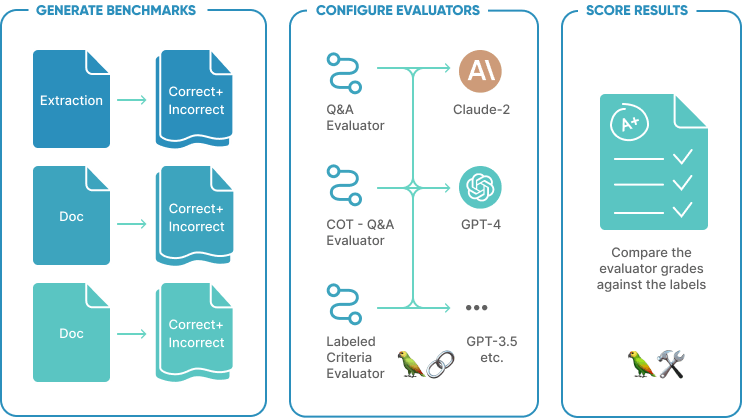
Model providers update models silently. A prompt that worked in January can produce subtly different output in March: different phrasing, different format, occasionally a different answer. Without evals, you will not catch it until a user reports it, and by then the regression has been live for weeks.
Reasoning and extended-thinking models are especially prone to variable behavior across versions because the answer often depends on multi-step intermediate reasoning. Evals should run on model version bumps and dependency upgrades, not just prompt changes.
Evals are systematic benchmarks: a fixed set of inputs with expected outputs or evaluation criteria that let you compare model versions, measure the effect of prompt changes, and catch regressions before they reach production.
A minimum viable eval harness is:
- 20–50 representative inputs covering normal cases, edge cases, and known failure modes
- Expected outputs or rubric-based evaluation criteria
- A script that runs them and reports a score
This is not a full MLOps platform. It is just enough to answer one question: did this change make things better or worse? Tools like LangSmith, Braintrust, or a simple pytest suite with LLM-as-judge scoring all work.
PRO TIP: Build the eval harness before you go to production, not after the first incident. Teams that add evals after a regression always wish they had 3 months of baseline scores to compare against.
Read More: Evaluate LLMs and RAG using LangChain and Hugging Face
Overlook AI system scalability
Companies often pilot AI systems on a small scale without considering how the system will scale across users, tenants, documents, regions, and compliance requirements. Starting small is a good approach, but scalability decisions should be visible from the beginning.
For most organizations, self-hosting LLMs is difficult because it requires specialist engineers, GPU capacity, monitoring, patching, and cost control. Most teams start with a managed cloud service, often alongside their existing AWS, Azure, or Google Cloud architecture. The main options are:
- Use a shared service where you pay based on the size of the input and output, typically measured in tokens.
- Deploy a model onto dedicated hardware. The choice of hardware, and hence cost, is driven by the size of the LLM model, latency target, request volume, and availability requirements.
This choice is similar to other cloud hosting decisions: teams balance convenience, control, cost, and operational responsibility. Dedicated hardware is typically economical only when workload volume is high and predictable. For most B2B AI products, the more urgent scalability work is easier to name: queue long-running jobs, define rate limits, cache repeated requests, isolate tenants, maintain vector indexes, monitor failures, and prepare incident response.
PRO TIP: If you are developing a customer-facing application that will be heavily used 24/7, validate the cloud architecture before launch: rate limits, region strategy, fallback models, retry policy, token budget, monitoring, logging, and security controls.
Our DevOps automation consulting services can assist you in developing a robust infrastructure to support your AI systems at scale. Contact us to learn more about how we can support your organization's growth and success.
Fail to respond to rapid technology changes
Best practices in AI product development today are different from those 6 months ago and very different from those 2 years ago. Model releases, context-window sizes, tool-calling standards, multimodal capabilities, inference pricing, and cloud-provider governance features change quickly.
Here's how you can navigate this ever-changing landscape:
- Stay informed: Track model-provider changes, cloud AI governance updates, security advisories, open-source framework maturity, and pricing shifts that can affect product margins.
- Adapt and innovate: Evaluate new AI design patterns against the workflow, eval scores, latency, and business outcome rather than adopting patterns because the market is discussing them.
- Train your team: Build shared understanding of AI product design, prompt versioning, RAG architecture, secure tool use, observability, and incident handling.
Conclusion
Building a successful AI product in 2026 requires disciplined product discovery, reliable data pipelines, secure integrations, eval-driven development, and cloud architecture that can absorb real usage. The teams that succeed do not treat AI as a feature pasted onto an application. They treat AI as a production system with measurable quality, cost, and governance requirements.
Looking for an AI software development company to help you minimize AI product development risks? At SoftKraft, we work with CTOs, founders, and product leaders to validate AI workflows, design RAG and LLM architectures, integrate AI with existing systems, and ship reliable products. Reach out to discuss the architecture before you scale the build.