
Automating Data Pipelines — Types, Use Cases, Best Practices
Quick Answer: Automated data pipelines reliably ingest, validate, transform, and deliver data for BI, operational applications, and AI. The right architecture depends on latency, change volume, recovery objectives, and compliance: use batch for scheduled analytics, streaming for event-driven decisions, and change data capture (CDC) for incremental database replication. Production pipelines need idempotent jobs, versioned schemas, lineage, access controls, quality checks, and observable service-level objectives.
For CTOs and data leaders, pipeline automation is a platform capability rather than a collection of scheduled scripts. It determines whether a dashboard, fraud model, customer workflow, or RAG application receives fresh, traceable data—or silently operates on incomplete records.
- What is an automated data pipeline?
- Which data pipeline architecture should a CTO choose?
- What business use cases benefit most from pipeline automation?
- When should a team not automate a data pipeline yet?
- What makes data pipelines fail in production?
- Which tools belong in a modern automated data pipeline stack?
- What should CTOs measure before automating a pipeline?
- How can SoftKraft help automate a data pipeline?
- Conclusion
What is an automated data pipeline?
An automated data pipeline is a repeatable workflow that moves data from operational sources to a target system and applies defined controls at every stage. A production pipeline typically ingests data from APIs, SaaS platforms, databases, files, or event streams; validates and transforms it; writes it to a warehouse, lakehouse, or application; and reports its health to operators.
The key distinction is operational control. A script that copies a CSV once is not a production pipeline. A production pipeline has an owner, a schedule or event trigger, retry and replay rules, idempotent writes that are safe to repeat, schema contracts, monitoring, and a documented response when a source or downstream system fails.
Which data pipeline architecture should a CTO choose?
Choose the architecture according to the business decision it supports. Batch, streaming, and CDC are complementary patterns; a mature platform often combines all three.
| Pattern | Typical latency | Operational complexity | Best fit | Key design control |
|---|---|---|---|---|
| Batch | Minutes to hours | Low to medium | Scheduled BI, finance close, backfills, ML training | Watermark, partitioning, and idempotent reruns |
| Streaming | Seconds to minutes | High | Fraud checks, telemetry, inventory, real-time alerts | Event time, deduplication, replay, and consumer lag |
| CDC | Seconds to hours | Medium to high | Database replication, cloud migration, operational analytics | Initial-load reconciliation, ordering, deletes, and upserts |
When is a batch data pipeline the right choice?
Batch processing moves a defined set of records on a schedule or after a threshold is reached. It is appropriate for daily finance reporting, CRM-to-warehouse synchronization, invoice reconciliation, historical backfills, and ML training datasets where a delay of minutes or hours is acceptable.
For example, a Python or dbt transformation can load the previous day's CRM and billing records into Amazon Redshift, Snowflake, or BigQuery. Partitioned Parquet files in Amazon S3, warehouse bulk loads, and an explicit watermark—the latest successfully processed record or time window—make the run recoverable and cost-predictable. Batch is often the simplest way to meet a business SLA without paying for low-latency infrastructure that no consumer needs.
When does a streaming data pipeline justify its complexity?
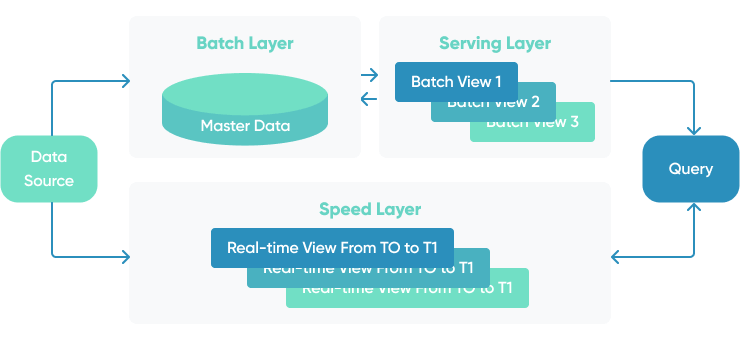
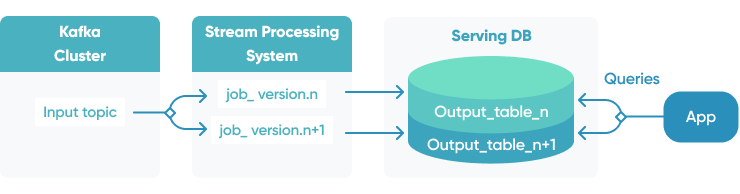
Streaming pipelines process events continuously or in short micro-batches. Use them when the value of a decision falls sharply with delay: payment fraud screening, inventory availability, IoT telemetry, user-behavior signals, real-time personalization, or operational alerting.
A typical architecture uses Kafka, Amazon Kinesis, or another durable event log; stream processors such as Apache Flink or Spark Structured Streaming; and a serving target such as a lakehouse table, operational datastore, or feature store. The design must define event time, late-arriving data, deduplication keys, retention, replay, and consumer lag. Without those decisions, “real time” usually means expensive and difficult to audit.
How does change data capture reduce replication volume and source-system load?
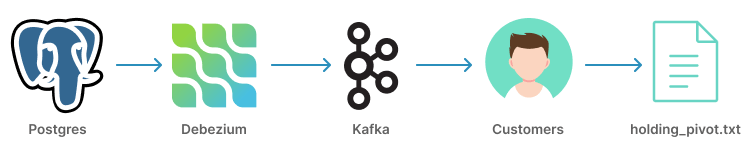
Change data capture (CDC) replicates inserts, updates, and deletes from a source database instead of repeatedly extracting full tables. CDC is a strong fit for cloud migrations, operational analytics, synchronization between services, and systems with high update volumes.
For AWS architectures, AWS Database Migration Service can capture database changes, while AWS Glue or Spark can apply incremental transformations downstream. When the target needs correct upserts and historical recovery, table formats such as Apache Iceberg support atomic commits, schema evolution, and time travel when used with a compatible catalog and compute engine. CDC still requires a plan for deletes, out-of-order events, primary-key changes, and initial-load reconciliation.
What does an AWS CDC pipeline look like end to end?
Consider a B2B SaaS product running on PostgreSQL. AWS DMS performs an initial load and then captures inserts, updates, and deletes into an Amazon S3 landing zone. An AWS Glue or Spark job validates the change records, quarantines invalid events, and merges valid records into Apache Iceberg tables. Amazon MWAA or AWS Step Functions coordinates dependencies, retries, and alerts. Curated tables then feed Amazon Redshift dashboards, a customer-health model, or a governed RAG ingestion job.
This design separates raw change capture from business transformations. It lets the team replay a failed partition, retain source-level evidence for audits, and change downstream models without reopening the production database to every consumer.
What business use cases benefit most from pipeline automation?
Pipeline automation creates measurable value when it removes manual reconciliation, improves decision freshness, or makes governed data reusable across multiple teams. It should be prioritized by the cost of a late, incorrect, or unavailable dataset—not by the number of tools in the stack.

How do automated pipelines improve BI and operational reporting?
Automated pipelines consolidate CRM, ERP, product, support, and finance data into a modeled warehouse or lakehouse. Analysts can work from versioned metrics instead of maintaining spreadsheet exports and manually resolving source discrepancies.
Define service-level objectives (SLOs): measurable targets for the datasets that matter, such as data freshness, completeness, failed-record rate, and time to recover. A finance dashboard might require data by 08:00 each working day, while an operations dashboard might need a 15-minute freshness target. These measures make pipeline ROI visible through reduced manual work, faster close cycles, fewer reporting disputes, and less incident-driven rework.
How do pipelines prepare enterprise data for AI and IDP?
AI systems require governed inputs, not simply more data. An AI-ready pipeline extracts structured and unstructured records, applies data-quality and PII controls, records lineage—the traceable path from source to output—and publishes reusable datasets for model training, retrieval, or scoring.
For intelligent document processing (IDP), a pipeline may route documents through OCR engines such as Amazon Textract or Google Document AI, validate extracted fields against business rules, keep the original document and confidence score, and deliver approved results to an ERP or case-management system. For RAG, the same discipline governs document ingestion, chunking, embeddings, metadata filtering, vector-index synchronization, and retrieval-quality monitoring.
Read our guides to data engineering automation, data maturity, and AI document processing to assess whether the underlying data foundation is ready for an AI program.
How do pipelines support compliance and data security?
In regulated B2B environments, a pipeline must show who accessed data, what transformation occurred, which source record produced an output, and how long data is retained. GDPR, SOC 2, ISO 27001, HIPAA, and financial-sector controls differ, but they consistently require explicit access management, encryption, audit evidence, retention rules, and incident response.
Use least-privilege IAM roles, managed secrets, encryption in transit and at rest, tokenization or masking for sensitive fields, separate development and production accounts, and immutable audit logs. Data classification should occur before records reach broadly accessible analytics zones. The NIST Cybersecurity Framework 2.0 is a useful reference for aligning these technical controls with organizational governance.
When should a team not automate a data pipeline yet?
Automation is not automatically the right first investment. Defer it when the process is a one-time migration, the data volume is small and stable, the business definition of the target metric is still disputed, or no team owns the source data and operational response. In those cases, first document the data model, assign ownership, establish a manual baseline, and confirm that the expected frequency or business risk justifies a maintained pipeline.
Avoid building a streaming platform merely because an organization wants “real-time” analytics. If a daily or hourly batch meets the decision deadline, it will usually be simpler to operate and easier to audit. The right next step may be a limited proof of value that validates source quality and SLOs before the platform is scaled.
What makes data pipelines fail in production?
Most failures are not caused by one bad transformation. They arise when a platform cannot detect or safely recover from changing data, partial runs, infrastructure drift, or unclear ownership.
- Schema and data drift: Source teams add columns, change types, or alter business definitions. Data contracts, compatibility rules, and validation gates prevent silent corruption. Kafka teams can use Confluent Schema Registry with Avro, Protobuf, or JSON Schema; warehouse and lakehouse teams should version their transformation models and tests.
- Non-idempotent retries: Retrying a failed run can duplicate payments, orders, or events when writes are not idempotent. Use stable event IDs, partition-level checkpoints, transactional merges, and a dead-letter path for records that cannot be processed automatically.
- Missing observability: A green workflow run does not prove that the data is correct. Monitor freshness, volume anomalies, null rates, lineage, task duration, queue lag, SLA breaches, and cost per run. OpenLineage provides an open standard for collecting lineage events across pipeline tools.
- Environment drift: Differences among development, staging, and production create avoidable incidents. Define infrastructure and permissions through Terraform or another IaC tool, use isolated environments, and promote tested configuration through CI/CD.
- Uncontrolled cloud cost: Full reloads, small files, unlimited retries, and permanently overprovisioned clusters can dominate the cost of an otherwise simple job. Track warehouse scan volume, storage lifecycle, worker utilization, and the cost of backfills separately from daily operations.
Which tools belong in a modern automated data pipeline stack?
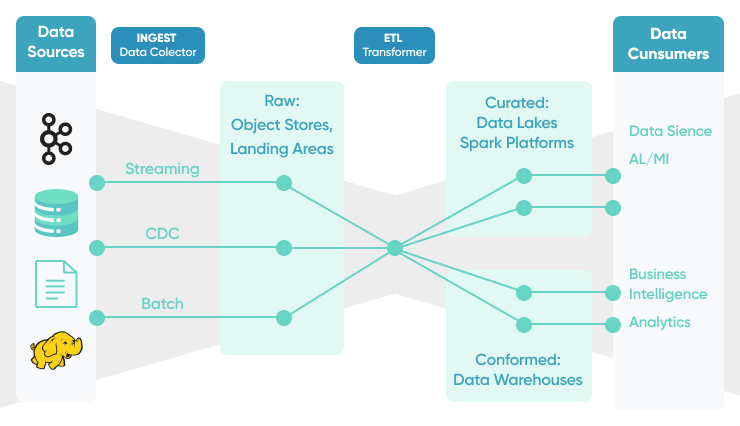
Tools should be selected by responsibility, not popularity. Airflow orchestrates work; it does not replace a connector, a warehouse, or a stream processor. AWS Glue executes managed ETL and Spark workloads; it does not automatically solve data modeling or governance.
| Platform responsibility | Common choices | Architecture decision |
|---|---|---|
| Ingestion and CDC | Airbyte, AWS DMS, Debezium, Kafka Connect, API clients | Select based on source support, incremental sync semantics, and how changes are retained. |
| Orchestration | Apache Airflow, Dagster, Prefect, AWS Step Functions, Amazon MWAA | Use an orchestrator for dependencies, schedules, retries, backfills, alerts, and cross-system workflows. |
| Transformation | Python, SQL, dbt, Apache Spark, AWS Glue | Keep business logic testable and choose the smallest compute engine that meets volume and latency needs. |
| Streaming | Apache Kafka, Amazon Kinesis, Apache Flink, Spark Structured Streaming | Design retention, ordering, replay, and consumer-lag controls before committing to real-time processing. |
| Storage and serving | Amazon S3, Apache Iceberg, Redshift, Snowflake, BigQuery, PostgreSQL | Match format and engine to query patterns, transactions, sharing needs, and retention policy. |
| Quality and observability | Great Expectations, dbt tests, OpenLineage, OpenTelemetry, CloudWatch, Prometheus, Grafana | Treat quality, lineage, and alerts as release criteria, not post-incident tasks. |
AWS-native teams can combine S3, AWS Glue, Redshift, Lake Formation, Step Functions, and MWAA. The AWS Glue best-practices guide is a current reference for data partitioning, job sizing, incremental processing, and cost optimization. Python remains effective for custom extractors, validation, orchestration tasks, and domain-specific transformations; use Pandas, Polars, DuckDB, Dask, or PySpark only where their execution model fits the workload.
What should CTOs measure before automating a pipeline?
Start with a baseline for the process being replaced. Measure manual hours, run duration, data freshness, error rate, rework, cloud cost, and the business impact of a late or incorrect dataset. Set target SLOs before choosing tools.
How can a team calculate a credible pipeline ROI baseline?
Use before-and-after operating data instead of a generic savings percentage. Record the monthly hours spent exporting, reconciling, and correcting data; the time from period close to a trusted report; the number and duration of data incidents; and the cloud, connector, and support costs of the new workflow. Compare those measures with the business consequence of stale data, such as delayed invoicing, missed alerts, or slower customer decisions.
For example, a finance team can compare the manual reconciliation hours and reporting delay before automation with the operating cost and SLO attainment of the new batch pipeline. A fraud or operations team can compare decision latency, false or missing events, and incident recovery time before and after a streaming or CDC deployment. This creates an auditable ROI case without inventing a universal percentage.
Use this review checklist:
- Reliability: Can the team rerun a partition or time window without duplication? Are retries bounded and are invalid records isolated?
- Data quality: Are schema, completeness, uniqueness, referential-integrity, and business-rule checks automated before publication?
- Security and compliance: Are data classes, IAM roles, secrets, encryption, retention, and audit trails designed for the target regulatory scope?
- Scalability: Can the platform handle historical backfills and growth without interrupting daily workloads or forcing a rewrite?
- Operability: Are data owners, runbooks, alerts, lineage, and escalation paths clear enough for an on-call engineer?
- Economics: Does the expected reduction in manual work, reporting latency, or business risk justify compute, storage, vendor, and operational costs?
How can SoftKraft help automate a data pipeline?
SoftKraft provides data engineering services for B2B teams that need to replace manual data flows, modernize a cloud data platform, or prepare governed data for BI and AI. A practical engagement begins with source systems, data volume, latency targets, existing cloud ecosystem, compliance obligations, and the KPI that the pipeline must improve.
Architecture and delivery roadmap
We map source-to-consumer data flows, identify bottlenecks and control gaps, and define a phased target architecture for batch, streaming, or CDC workloads. The output can include a backlog, data contracts, an operating model, and measurable reliability and ROI targets.
Cloud ETL, lakehouse, and warehouse implementation
We implement tested ingestion, transformation, storage, and orchestration workflows using AWS and Python ecosystems where appropriate. The scope can cover S3, Glue, MWAA, Redshift, Kafka, dbt, Spark, Iceberg, Terraform, and CI/CD.
Data quality, observability, and AI readiness
We add validation, lineage, access controls, cost visibility, and operational dashboards so that BI, ML, IDP, and RAG use cases receive traceable data rather than unverified extracts.
Conclusion
Data-pipeline automation is valuable when it makes important data dependable: fresh enough for the use case, correct enough for the decision, secure enough for the regulatory scope, and observable enough to recover from failure.
Batch, streaming, and CDC solve different latency and change-management problems. The durable design choice is to define data contracts, idempotency, quality gates, lineage, and operating metrics first, then select AWS, Python, Airflow, Kafka, Spark, or warehouse tooling that supports those requirements. For related architecture choices, see our guide to Python data pipelines and Apache Airflow.