
7 Expert Tips to Build High-Performance Python Data Pipelines
Quick Answer: A high-performance Python data pipeline moves data from source systems to analytics, AI, or operational applications with validated schemas, automated orchestration, efficient storage formats, and observable runtime metrics. For CTOs, the strongest architectures combine Python, an orchestrator such as Apache Airflow, Dagster, or Prefect, a processing engine such as Pandas, Polars, DuckDB, Dask, or PySpark, Parquet on cloud object storage, and explicit controls for lineage, retries, access, and data quality.
Global data volume is still rising fast. IDC's Global DataSphere Forecast 2025-2029 tracks the yearly volume of data created, captured, replicated, and consumed, and 2026 public estimates put annual data generation at around 221 zettabytes. For B2B teams, the practical question is not "how do we store more data?" but "how do we turn messy operational data into reliable inputs for business insights, BI dashboards, and production AI solutions without creating data debt?"
Python data pipelines answer that question by automating ingestion, validation, transformation, storage, and delivery. A mature pipeline architecture gives CTOs and data leaders control over latency, cost, lineage, security, and recoverability across batch jobs, streaming workloads, and AI readiness programs.
What are the basic steps of a Python data pipeline?
A Python data pipeline is an automated sequence that collects data from source systems, validates it, transforms it into a usable model, stores it in a target layer, and exposes it for analytics, machine learning, or operational workflows. The target can be a relational database, data warehouse, data lake, lakehouse, feature store, vector database, or application API.
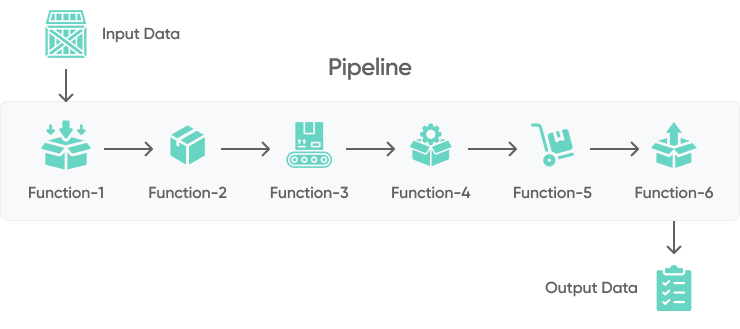
Most production pipelines include five core stages:
- Collect input data: Python jobs pull data from REST APIs, SaaS platforms, event streams, files, databases, or message queues. Common tools include
requests,httpx,boto3,sqlalchemy, Kafka clients, and managed connectors in AWS Glue or Airflow providers. - Clean up and validate the data: Validation prevents bad records from reaching BI, AI, or customer-facing workflows. Teams use schema checks, type validation, deduplication, null handling, referential integrity checks, and tools such as Great Expectations or Pydantic.
- Convert and transform the data: Transformations normalize formats, join sources, aggregate metrics, enrich records, and prepare curated tables. Python teams often use Pandas, Polars, DuckDB, Dask, PySpark, dbt, or SQL executed through orchestration tasks.
- Store the data: Storage choices depend on volume, latency, compliance, and query patterns. Common targets include PostgreSQL, Snowflake, BigQuery, Amazon Redshift, S3 data lakes, Parquet files, Apache Iceberg or Delta Lake tables, and NoSQL systems.
- Analyze, monitor, and serve the data: The final layer powers dashboards, ML features, reverse ETL, reporting APIs, or AI retrieval workflows. Production pipelines also expose health metrics, error rates, SLA adherence, and lineage events.
Which technologies are best for building Python data pipelines?
The best Python data pipeline stack depends on workload type: batch analytics, near-real-time operations, ML feature generation, regulatory reporting, or AI retrieval. For most B2B systems, the architecture should combine orchestration, processing, storage, quality checks, and observability instead of relying on one library.
Orchestration frameworks
Orchestration frameworks schedule jobs, manage dependencies, retry failures, and expose operational visibility.
- Apache Airflow: Airflow 3 defines workflows as DAGs and data assets through a stable Task SDK. It is a strong fit for scheduled batch pipelines, event-driven workflows, cross-system dependencies, and teams that need mature observability, provider integrations, backfills, and operational control.
- Dagster: Dagster uses an asset-centric model with built-in lineage, partitioning, testing, and strong dbt integration. It is a good fit for greenfield data platforms that organize orchestration around the datasets they produce.
- Prefect: Prefect works well for Python-native workflows that need retries, state handling, parameterization, and hybrid execution across local, cloud, and containerized environments.
- Luigi: Luigi handles task dependencies and workflow visualization. It is primarily relevant to existing platforms and simpler legacy dependency graphs rather than new, asset-oriented data platforms.
- AWS Step Functions and AWS Glue: AWS-native teams can use Step Functions for serverless orchestration and Glue for managed ETL, metadata cataloging, and Spark workloads.
Processing libraries
Processing libraries determine how data is transformed, validated, parallelized, and prepared for downstream workloads.
- Pandas: Pandas is the default choice for tabular transformations, exploratory data work, and moderate-size batch jobs.
- Polars: Polars provides a multithreaded, Arrow-compatible DataFrame engine with lazy query optimization. It is a strong choice for performance-sensitive transformations that still fit on one machine.
- DuckDB: DuckDB is an embedded analytical SQL engine that queries Parquet, CSV, Arrow, and DataFrames directly. It works well for local analytics, complex joins, and larger-than-memory workloads without operating a separate database server.
- NumPy: NumPy provides efficient arrays, vectorized numerical operations, and the base layer for many analytics and ML libraries.
- Dask: Dask extends Pandas and NumPy patterns to larger-than-memory datasets and distributed clusters.
- PySpark: PySpark supports large-scale distributed transformations, lakehouse processing, and data engineering workloads that exceed a single machine.
- Scikit-learn: Scikit-learn helps when pipelines prepare features, train models, validate datasets, or support predictive analytics workflows.
Storage, quality, and observability
Production-grade data pipelines also need durable storage, contracts, and monitoring.
- Storage formats: Parquet is the default columnar format for analytical data. Apache Iceberg is a strong default table format for open, multi-engine lakehouses, while Delta Lake remains a natural choice for Databricks- and Spark-centric platforms. Avro remains useful for row-oriented event and Kafka workloads, ORC for selected Hadoop ecosystems, and HDF5 for scientific or numerical data.
- Data quality: Great Expectations, Pydantic, Soda, and dbt tests help enforce data contracts before data reaches dashboards or AI models.
- Observability: Prometheus, Grafana, OpenTelemetry, OpenLineage, and Airflow metrics help teams detect bottlenecks, failed SLAs, and upstream data drift.
- Cloud controls: AWS IAM, KMS encryption, VPC endpoints, CloudWatch, S3 lifecycle policies, and Lake Formation help align pipelines with data security and B2B compliance requirements.
How do Python data pipelines support AI readiness?
Python data pipelines support AI readiness by converting fragmented operational data into governed, observable, and reusable datasets. Before a company deploys AI agents, recommendation systems, predictive models, or RAG workflows, data teams must answer four architecture questions:
- Can the pipeline prove data quality? AI outputs depend on valid schemas, source freshness, deduplicated records, and clear exception handling.
- Can the pipeline preserve lineage? CTOs need traceability from source systems to curated tables, features, embeddings, and model outputs.
- Can the pipeline handle sensitive data? Personally identifiable information, financial records, health data, and B2B customer data require masking, access control, audit logs, and encryption.
- Can the pipeline scale without cost spikes? AI workloads can multiply storage, compute, and API costs when batch sizes, retries, and caching are poorly designed.
In practical terms, an AI-ready Python pipeline often includes S3 or another data lake layer, Parquet files, Airflow, Dagster, or Prefect orchestration, validation gates, metadata cataloging, feature extraction, and monitoring. For RAG systems, the same pipeline may also generate embeddings, synchronize vector indexes, and log retrieval quality metrics.
What are the 7 best practices for high-performance Python data pipelines?
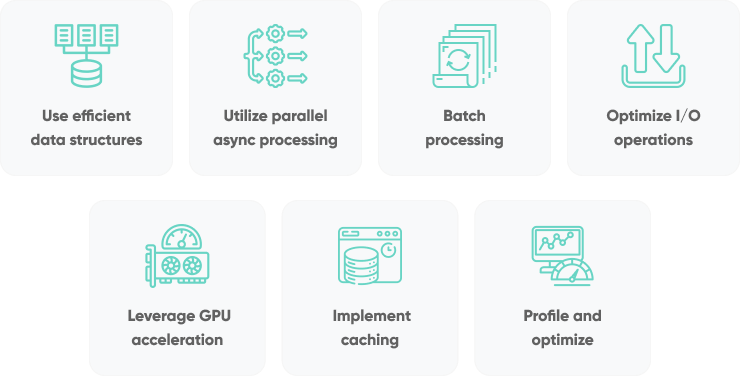
The following practices improve throughput, reliability, and maintainability in Python data pipelines. They are especially relevant when a pipeline feeds BI dashboards, customer analytics, ML training jobs, or production AI systems.
Use efficient data structures
Efficient data structures reduce CPU time, memory pressure, and serialization overhead. In Python pipelines, the wrong structure can turn a simple transformation into a slow, memory-heavy process.
- Use arrays instead of lists for large numerical datasets: Python lists store object references, while arrays and NumPy arrays store compact typed values. This difference matters for numeric transformations, vectorized operations, and memory-bound jobs.
- Choose the DataFrame engine for the workload: Pandas works well for familiar, moderate-size in-memory transformations. Polars adds lazy execution and automatic multithreading for performance-sensitive Python pipelines, while DuckDB is often the better choice for SQL-heavy joins and aggregations directly over Parquet or CSV files.
- Prefer NumPy arrays for numerical computations: NumPy supports vectorization and broadcasting, which can remove slow Python loops from transformation code.
- Scale in stages: Before introducing a distributed cluster, test whether Polars or DuckDB can meet the target on one machine. Move to Dask or PySpark when data volume, concurrency, or recovery requirements genuinely exceed a single node.
Use parallel and asynchronous processing
Parallel and asynchronous processing should match the bottleneck. CPU-bound transformations need process-level parallelism or distributed compute; I/O-bound workloads need concurrency around network, database, and file operations.
Multiprocessing for CPU-bound tasksPython's Global Interpreter Lock can limit CPU-bound threads. The multiprocessing module, Dask, Ray, or PySpark can distribute transformations such as feature extraction, parsing, compression, image processing, and statistical calculations across cores or workers.
For API calls, database reads, cloud object storage operations, and file I/O, asyncio, aiohttp, asyncpg, or httpx can increase throughput by reducing idle wait time. This is useful for ingestion jobs that call many external APIs or synchronize many small objects.
PRO TIP: Combine concurrency with explicit rate limits, retries, idempotency keys, and dead-letter handling. A fast ingestion pipeline that overwhelms an API, duplicates records, or hides partial failures creates operational risk.
Process data in batches
Batch processing reduces overhead by moving many records through the same read, validation, transformation, and write operation. It also enables vectorized operations in Pandas, Polars, and NumPy and makes checkpointing easier.
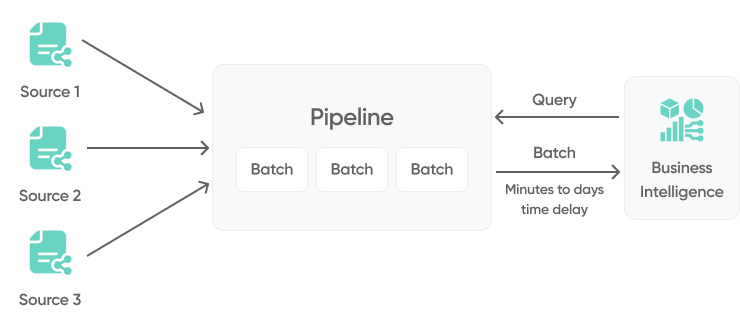
Batch size should be chosen deliberately. Small batches reduce memory risk and improve failure recovery, while larger batches can improve compression ratios, reduce network overhead, and maximize warehouse loading performance. In cloud architectures, teams often tune batch sizes around S3 object size, warehouse load limits, API quotas, and worker memory.
PRO TIP: Use chunked reads, streaming or lazy execution, and partitioned files when processing large datasets. Pandas read_csv(..., chunksize=...), Polars lazy scans, DuckDB queries over partitioned Parquet, and Dask DataFrames can keep memory usage predictable during backfills.
Optimize I/O operations
I/O is often the real bottleneck in Python data pipelines. Slow reads, chatty writes, inefficient file formats, and repeated network calls can dominate runtime even when transformation code is efficient.
- Use high-performance storage formats: Parquet and ORC improve analytical query performance through columnar storage, compression, and predicate pushdown. Apache Iceberg adds transactions, time travel, schema evolution, and broad multi-engine interoperability; Delta Lake offers equivalent table-management capabilities with particularly strong Databricks and Spark integration. HDF5 remains useful for scientific and numerical data.
- Use buffered and bulk I/O: Buffered writes, warehouse bulk loads, S3 multipart uploads, and database copy commands reduce per-record overhead.
- Compress intentionally: Snappy, Zstandard, and Gzip reduce storage and transfer costs, but compression settings should be tested against CPU overhead and query latency.
- Use memory mapping for very large files: Memory-mapped files help read large datasets without loading the entire file into RAM.
- Reduce unnecessary serialization: Avoid repeated conversions between JSON, CSV, DataFrame, and database rows inside the same job.
Use GPU acceleration only when the workload fits
GPU acceleration helps when the pipeline performs large numerical computations, matrix operations, image processing, embedding generation, or ML feature transformations. It is not a default answer for every pipeline because data transfer, orchestration, and GPU availability can erase the benefit.
CuPyaccelerates NumPy-like operations on NVIDIA GPUs through CUDA. For larger workloads, teams can pair CuPy with Dask, RAPIDS cuDF, or distributed GPU clusters. In AI pipelines, GPUs are often most valuable during embedding generation, model inference, vector processing, and image or document preprocessing.
PRO TIP: Benchmark end-to-end runtime, not only the accelerated function. Include data loading, CPU-to-GPU transfer, serialization, orchestration overhead, and cloud GPU cost in the calculation.
Implement advanced caching mechanisms
Caching reduces repeated compute, API calls, database reads, and embedding generation. It is most useful when inputs are stable, transformations are expensive, or external services introduce latency and cost.
- Use joblib for function caching: joblib can persist expensive function results to disk and is useful for long-running scientific or ML preprocessing jobs.
- Use functools.lru_cache for small in-memory results: Python's functools.lru_cache works for deterministic functions with repeated inputs and bounded memory needs.
- Use distributed caching for shared workloads: Redis and Memcached support shared cache access across workers, services, and pipeline stages.
- Cache external API responses carefully: Store response metadata, timestamps, request parameters, and invalidation rules so downstream analytics do not use stale or non-compliant data.
Profile, monitor, and optimize continuously
Profiling identifies where Python code spends time; monitoring shows whether production pipelines meet service-level expectations. Both are needed because a pipeline can be fast in a notebook and unstable in production.
Python tools such as cProfile, line_profiler, memory_profiler, and py-spy help isolate slow functions, memory leaks, and inefficient loops. For production observability, teams can use Airflow metrics, Spark monitoring, Prometheus, Grafana, OpenTelemetry, and structured logs.
Track metrics that matter to the business and the platform: run duration, records processed, failed records, retry count, data freshness, SLA breaches, cloud cost per run, worker memory, queue depth, and downstream dashboard or AI model impact.
How should CTOs evaluate Python data pipeline architecture?
CTOs should evaluate Python data pipelines through reliability, scalability, security, cost, and maintainability. A technically elegant script is not enough if the pipeline cannot recover from partial failure, explain data lineage, control access, or support future AI workloads.
Use this checklist during architecture review:
- Reliability: Are jobs idempotent? Are retries bounded? Is there a dead-letter path for invalid records? Can the team replay a partition or time window without duplicating data?
- Scalability: Can the pipeline move from Pandas to Polars or DuckDB, and then to Dask, PySpark, or managed cloud processing when required, without a full rewrite? Are partitions, indexes, and storage formats designed for growth?
- Security: Are secrets managed outside code? Are IAM permissions scoped? Is data encrypted at rest and in transit? Are sensitive fields masked or tokenized?
- Compliance: Can the organization produce audit logs, lineage records, retention controls, and access history for GDPR, SOC 2, ISO 27001, HIPAA, or fintech requirements?
- Cost control: Are compute resources right-sized? Are backfills separated from daily jobs? Are storage lifecycle policies, compression, and caching in place?
- Maintainability: Are transformations tested? Are schemas versioned? Are owners assigned? Are runbooks and alerts clear enough for an on-call engineer?
Data engineering with SoftKraft
SoftKraft provides data engineering services for teams that need production-grade data pipelines, cloud data platforms, analytics systems, and AI-ready datasets. Our Python development team can help design pipeline architecture, implement orchestration, migrate workloads to AWS, improve data quality, and prepare operational data for BI, ML, or RAG-based AI systems.
The most useful engagement starts with the architecture constraints: source systems, data volume, latency targets, security requirements, compliance expectations, cloud ecosystem, and business KPIs. That context determines whether the right answer is a lightweight Pandas pipeline, a Polars or DuckDB process on one node, asset-oriented orchestration, Airflow DAGs on AWS, PySpark jobs, streaming ingestion, warehouse-first transformations, or a hybrid architecture.
Conclusion
High-performance Python data pipelines require more than fast code. The durable advantage comes from validated schemas, efficient file formats, clear orchestration, controlled concurrency, observability, security controls, and architecture decisions that match business goals.
For teams preparing data for AI or BI, Python remains a strong foundation because it connects orchestration, transformation, ML, cloud infrastructure, and monitoring in one ecosystem. The key is to design the pipeline as a governed platform capability, not a one-off script.